bsdf.cp311-win_amd64.pyd was loaded without ImportError?
I’m guessing bsdf was compiled with AVX enabled, but your CPU doesn’t support AVX.
bsdf.cp311-win_amd64.pyd was loaded without ImportError?
I’m guessing bsdf was compiled with AVX enabled, but your CPU doesn’t support AVX.
How would i go about fixing that and disabling AVX in my current version to see if thats the issue? i may have to rebuild a version that has that turned off, and if thats the case i would need the instructions to do so as i dont know/remember how.
You need to install Visual Studio with “Desktop development with C++”.
Then,
git clone https://github.com/LBNL-ETA/pyradiance.git pyradiance-src
diff --git a/CMakeLists.txt b/CMakeLists.txt
index b94f51e..f2fefce 100644
--- a/CMakeLists.txt
+++ b/CMakeLists.txt
@@ -74,7 +74,6 @@ if(MSVC)
     /GL # Whole program optimization
     /Qpar # Auto-parallelizer
     /fp:fast # Fast floating-point model
-    /arch:AVX2 # Use AVX2 instructions (modify based on target CPU)
     /GT # Fiber-safe optimizations
     /GF # String pooling
   )
py -3.11 -m pip install .\pyradiance-src
You still have dlltracer in your code, but it seems -future helped.
Can you also try to run sde.exe -- python -c "import pyradiance; print(pyradiance)". It seems sde is running programms in more strict mode and instead of DLL load failed while importing bsdf: A dynamic link library (DLL) initialization routine failed. we might be able to see the actual instructions that’s breaking.
But ensure to remove dlltracer patch for __init__.py from this post A way to narrow down `A dynamic link library (DLL) initialization routine failed.` - #7 by Andrej730 before running it.
I’ve tried to reproduce issue locally using SDE. I guess -glp is the closest option to Intel(R) Pentium(R) Silver J5040 CPU in SDE, but it’s hard to reproduce it - it seems in my case python’s vcruntime140.dll is also using incompatible instructions:
> sde.exe -glp -- python
TID 0 SDE-ERROR: Executed instruction not valid for specified chip (GOLDMONT_PLUS): 0x7ffcc79a1ec7: vmovdqu ymm0, ymmword ptr [rdx]
Image: Python311\VCRUNTIME140.dll+0x1ec7
Function: __NLG_Return2
Instruction bytes are: c5 fe 6f 02
But I’ve built a whl with /arch:AVX2 # Use AVX2 instructions (modify based on target CPU) removed from cmakelists.
@Flamesofshadow you can try it out with pip install pyradiance-1.1.3-cp311-cp311-win_amd64.whl (ensure to uninstall previous package with pip uninstall pyradiance)
@Andrej730 i went through the process of downloading and installing pyradiance-1.1.3-cp311-cp311-win_amd64.whl after i uninstalled my version of pyradiance.
I ran pip show pyradiance it looks correct
Version: 1.1.3
Summary: Python inteface for Radiance
Home-page: https://github.com/lbnl-eta/pyradiance
Author:
Author-email: Taoning Wang <taonignwang@lbl.gov>
License:
Location: C:\Users\.....\AppData\Local\Programs\Python\Python311\Lib\site-packages
Requires: numpy
Required-by:
ran py -3.11 -c “import pyradiance.bsdf as m; print(‘BSDF loaded OK’)”
BSDF loaded OK
I then ran sde.exe – python -c “import pyradiance; print(pyradiance)” to see what would happen. it just gave this with nothing else:
<module 'pyradiance' from 'C:\\Users\\.....\\AppData\\Local\\Programs\\Python\\Python311\\Lib\\site-packages\\pyradiance\\__init__.py'>
Great! Seems like this approach worked after all 
Can you please try the same command but using pyradiance from pip instead?
I tried VirtualBox which doesn’t support AVX.
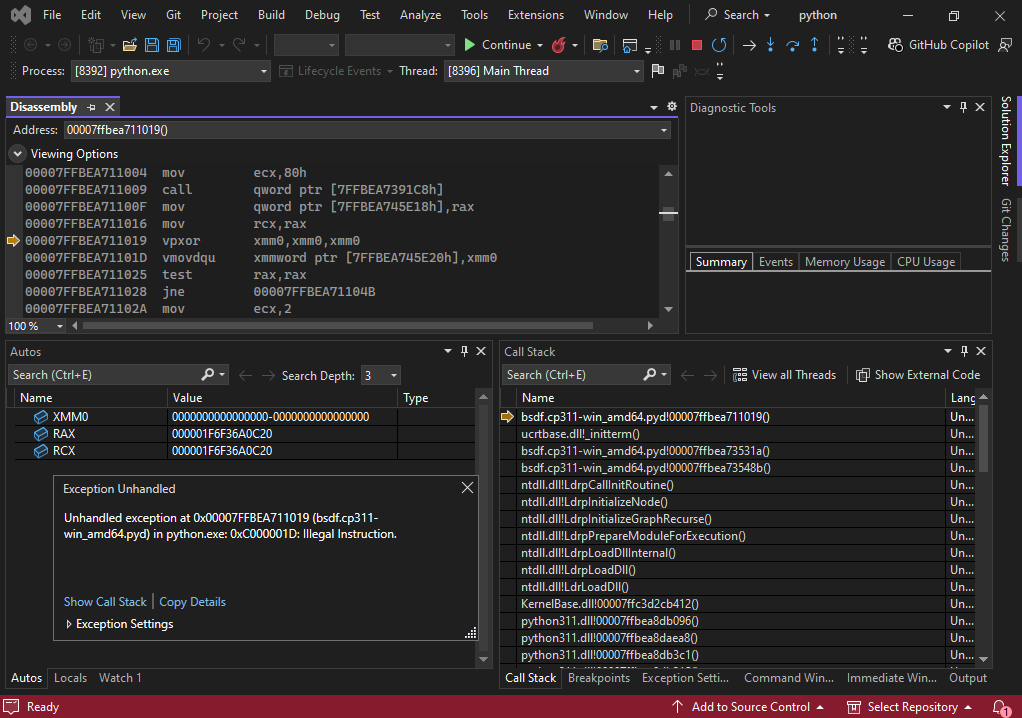
Visual Studio debugger worked to catch the error.
In this case, the error occured while initializing global variable “Buffer buf(128);” defined in nanobind/src/error.cpp.
are you wanting me to uninstall the .whl pyradiance and then try an unmodified version using these steps?
pip uninstall -y pyradiance

pip install pyradiance

py -3.11 -c "import pyradiance; print(pyradiance.__file__)"

sde.exe -- python -c "import pyradiance; print(pyradiance)"Yes. I guess the results should be similar to what Yukihiro Nakadaira found in Visual Studio.
as soon as i got to py -3.11 -c “import pyradiance; print(pyradiance.file)” i got this error again:
  File "<string>", line 1, in <module>
  File "C:\Users\.....\AppData\Local\Programs\Python\Python311\Lib\site-packages\pyradiance\__init__.py", line 11, in <module>
    from .bsdf import spec_xyz, xyz_rgb
ImportError: DLL load failed while importing bsdf: A dynamic link library (DLL) initialization routine failed.
then i followed up with the sde just to see what I’d get:
Notice: No chip or cpuid.def file were given, so host's cpuid was used for chip check. Image: C:\Users\.....\AppData\Local\Programs\Python\Python311\Lib\site-packages\pyradiance\bsdf.cp311-win_amd64.pyd+0x1019
Instruction bytes are: c5 f9 ef c0
the SDE does look similar to what Yukihiro found, so as far as i can understand it it does seem like its cpu related because the .whl version didnt give the errors.
Issue got fixed in pyradiance and it now just works.
Thanks to everyone looking at this, a special thanks to @Flamesofshadow for remarkable patience and @ynkdir for an unbelievable and very precise insight that led to solving the case.