Would the presence or absence of __file__ in dir() signal whether you’re running a script from a file or in interactive mode?
This is helpful. Does pressing the the green play/run button count as running within the IDE? I’m not a daily PyCharm user, but if so then it looks like you could use os.getenv('PYCHARM_HOSTED') == '1' which works both in the PyCharm Python console as well as using the run button. A different environment variable may be able to discriminate further.
But I am slightly confused in that, doesn’t running from the command line still have a screen for outputting text?
Nope __file__ is present in both.
I can’t see __file__ in a plain REPL (started from a terminal, no IDE), nor in PyCharm’s Python console. How and where are you looking for it?
Obviously not generic to other IDE environments but yes that certainly works in PyCharm.
You are right that running from a command prompt window does have an output screen, I hadn’t thought about that; I was just thinking about it being run from the ‘run’ command.
print(hasattr(dir(), "__file__"))
returns False for both environments
Try print("__file__" in dir()), it might work.
That returns True for both environments.
I get False for a plain REPL and PyCharm’s REPL, how are you running this exactly?
Just putting it in a Test program within the IDE and clicking the ‘play’ button. Now also have a command prompt open and run the same from there.
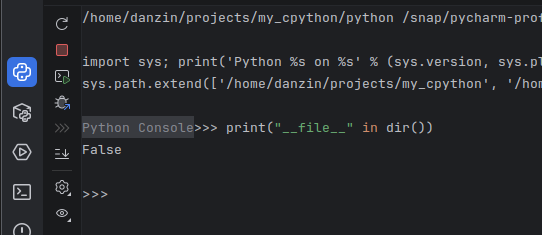
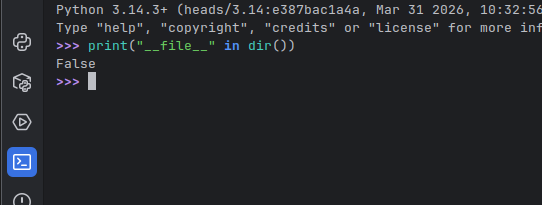
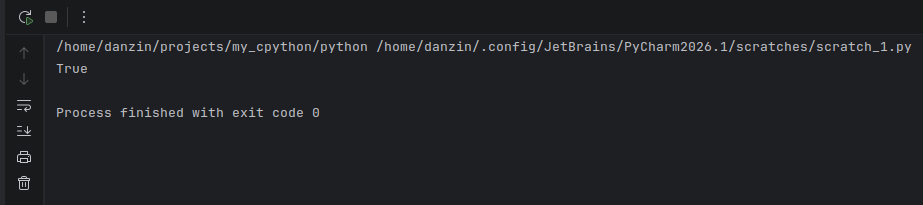
Well I wasn’t running it from the PyCharm Console, rather putting it into a Test.py within the IDE and running that.
That’s the “script mode”, right? How are you running the “interactive mode”?
I presumed that running it from within the IDE would be running in interactive mode.
Ah, I see. Usually we use “interactive mode” to mean running Python without a file/script, e.g. from the REPL or by passing some code to python -c "...".
That’s where the confusion came from and that’s why many people reported the other methods were working, while they didn’t work for you. The others were trying the REPL for interactive mode, while you were running from a file.
If one runs python -i script, python runs the script in script mode and then switches to interactive mode. In the 3.15 REPL, file is removed in the followup interaction. In IDLE it is not. From the above discussion, I suspect PyCharm leaves it also. I may ask on coredev discord if either behavior is more correct. The doc for module.file is empty.
The discussion of input modes here might be relevant to this discussion.
Although only for PyCharm that works really well, best solution I have seen yet, thanks.
if os.getenv('PYCHARM_HOSTED'): # interactive mode
logging.basicConfig(format="%(asctime)s %(levelname)s %(message)s", encoding="utf-8", handlers=[logging.StreamHandler()])
You could try inspecting the environment variables when run through other IDEs you care about and combine the conditions. For example, looks like VSCode might set VSCODE_INJECTION. I doubt there is a more general way to distinguish between “clicking run in an IDE” and “running from a command prompt” as the former isn’t a standardized concept in Python.