Is there any way I can tell the PyCharm Type-checker to ignore all warnings for a particular variable? I know I can ignore each line but as this variable is used all over the project it would be good to find some way to ignore it across all modules.
Can you give an example of something that you need to type ignore every time it’s used? In general, if you’re ignoring every time, that’s a good sign that you’ve got an actual error here that you should fix.
The variable in question is something which is written into builtins as the app starts and is therefore available to all code in the project without having to import in every module.
That sounds cursed. I would recommend just importing the variable in every file. No-one really reads the imports except in order to trace where symbols were defined, so having it in the imports there in every file is only helpful to readers. If it’s actually a problem for you to type it (which I find hard to imagine) use templates (for all your new .py files).
3 Likes
Pyright allows providing extra builtins definitions: pyright/docs/builtins.md at main · microsoft/pyright · GitHub. I would recommend looking for a similar solution in PyCharm.
3 Likes
No more cursed than a global statement which isn’t actually related in any way to a global scope.
To anyone outside of the orthodox Python religion it is seen as laughable that global is module level scoped. Whoever decided to name that “global” needs to give their head a wobble; should have been called module or mod_global or something like that. However we are where we are and adding a class of constant definitions into builtins is the cleanest way I can see of creating proper global variables.
At this point I do have to wonder why you are using Python, when you seem to dislike it so much.
8 Likes
Python has lots going for it, just not the obscurely, and very confusingly, named global statement.
It is more cursed. You created this post to figure out how to solve a problem you’ve created by stuffing something into builtins. If you import it the expected way, then your type checker will understand it.
I know you don’t like global. That’s not a reason to misuse Python and then ask us for help to fix the problems that follow.
8 Likes
The global keyword makes the symbol writable from within a closure such that what would’ve originally been an assignment to a name local to that scope modifies a module-level variable instead.
Since the variable in said closure is called local, the variable in the outermost scope is called global. No scope is outiside the global scope, and when you import a module, its global scope becomes the module dictionary. If there were a keyword that makes a variable accessible everywhere, how would it work? Python would have to locate the file it is defined in, so you will have to specify that file somehow, at which point you’re essentially doing an import.
Thus, I’d like an actual example of who sees this laughable. It made perfect sense to me and my peers when we first learnt the language.
Defining a new builtin introduces this tooling problem. If you’d like to go to the lengths of changing your type checker, nobody can stop you. Still, importing in each file would save you the trouble. It’s only one more line per file, it’s the expected way to do things, and you can ensure the symbol is present even if something goes wrong at app startup. Not to mention how manually inserting a builtin makes it accessible to other code than your own as well, for example your dependencies.
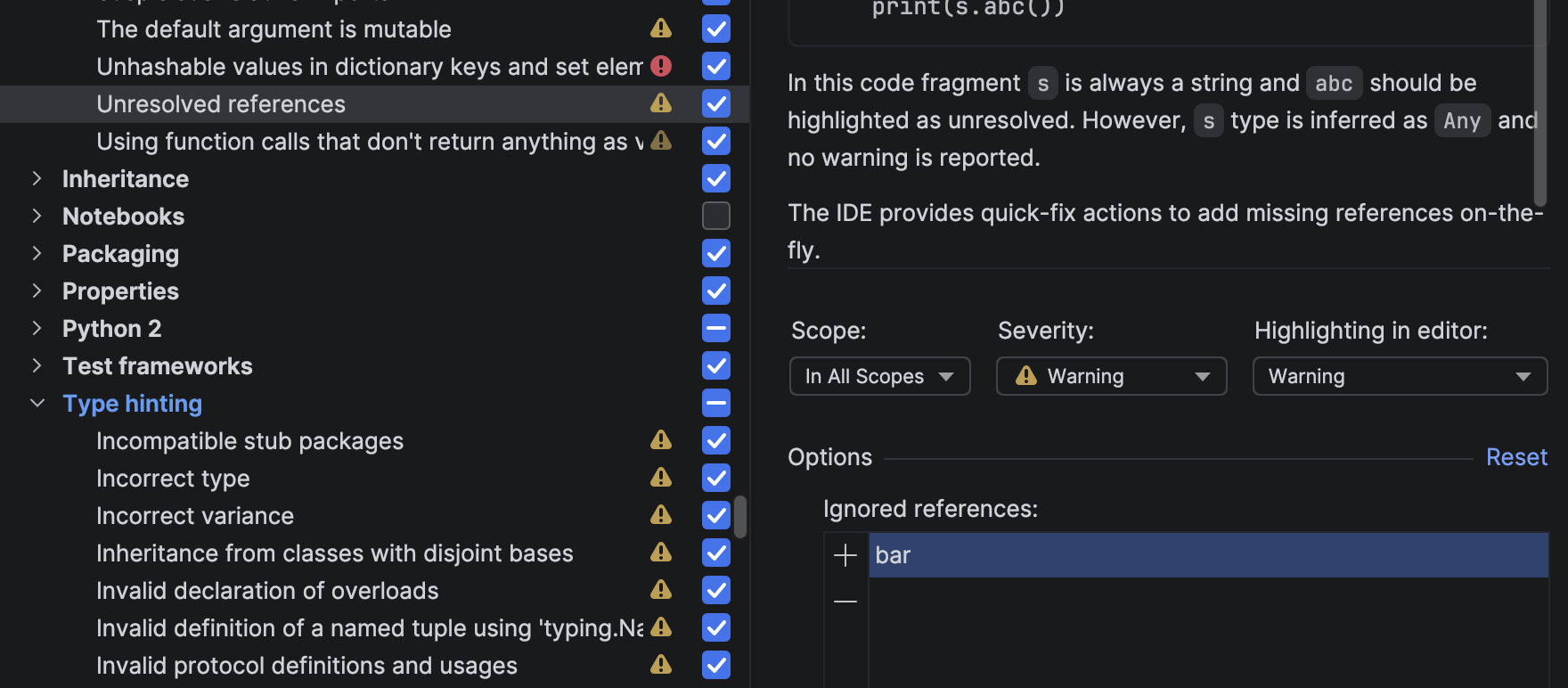
@NickC look in Settings > Editor > Inspections > Python > General > Unresolved References, and add your variable to “Ignored References”
5 Likes
Many thanks @KotlinIsland that works perfectly. Was originally hoping to find some sort of type-hinter directive which did this but perhaps that is not possible.
1 Like
By the way here is how I am modifying builtins so that I can refer to constants anywhere in my project like this: _app.myConst1
Main.py:
import Constants # type: ignore # adds _app to builtins
Constants.py:
from dataclasses import dataclass
@dataclass(frozen=True)
class _Constants:
    myConst1 = 'myConst1'
    myConst2 = 'myConst2'
    ...

import builtins, sys
builtins._app = _Constants
del builtins; del sys.modules["builtins"]
@jonathandung Orighinally I was using from Constants import *, however as the Constants list gets bigger that becomes a wasteful overhead for each module. Remember Python doesn’t just import the variables which are use but all of them; although maybe that is something which could be changed for a future version of Python?
Putting the constants behind a class in builtins means they are only loaded once into memory and each module just uses a pointer to the same list.
Now that I see your code, you’re most definitely doing too much. from imports are not the only kind of imports; you can have the your declarations in, say, _app.py, and import _app using a suitable relative or absolute import. The names will be under the _app module.
So that would be
# project/_app.py
const1 = 'A'
const2 = 'B'

# project/some_component.py
from . import _app
print(_app.const1) # outputs A
There is no concern of memory wastage when importing something multiple times because module objects are cached in sys.modules.