Animating a ball bouncing

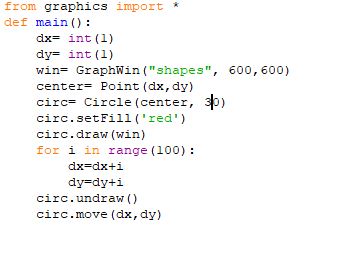
Want I want to be able to do is to animate a red ball bouncing around on a screen via a for loop. I have variables dx and dy I want to initialize to 1 at the outset but then values will be updated. However when I run the code nothing happens. Also I attached a screenshot of my code.

Any help will be appreciated

If I understand correctly, you draw a circle, set dx and dy to approximately 5000, undraw the circle and move it.

I would erase all code below the line that draws the circle and work on getting something visible on the screen.

One tip: things go very fast on a computer. You might want to throw in some sleep.

Good luck!

Silly remark probably, but from your screenshot it looks like you forgot to actually call your function

Please don’t post screenshots.

Copy and paste any code or traceback, and in order to preserve formatting, select the code or traceback that you posted and then click the </> button.

All the for loop does is increment dx and dy. The lines that undraw and move the circle are outside the loop. It’s just drawing the circle, changing dx and dy repeatedly, and then undrawing and moving the circle.

1 Like

thanks for the reccommendation

Here is a version that works, in case you struggle to get something on screen:

from graphics import *
import time


def main():
    win = GraphWin("shapes", 800, 600)
    win.setBackground("white")
    radius = 30
    circ = Circle(Point(100, 100), radius)
    circ.setFill("red")
    circ.draw(win)
    dx = 5
    dy = 0
    while circ.getCenter().getY() < 600:
        time.sleep(0.01)
        dy += .1
        circ.move(dx, dy)
    win.close()


if __name__ == "__main__":
    main()

From there, it is quite easy to get the ball to bounce, and add gravity etc.

Thank you . I was thinking of the random method

You can just ask if you have any questions.

Hello than you for your response. I have updated the code since then but its not doing what I want. Every time I run it the ball continues to move out of frame. I have adjusted the graphic window size as well as the random range numbers to be more in sync. Heres what I have so far:
import time
import random
from graphics import *
def main():
window_width= 150
window_length=150
dx= int(1)
dy= int(1)
win= GraphWin(“shapes”, window_width,window_length)
center= Point(dx,dy)
circ= Circle(center, 30)
circ.setFill(‘red’)
circ.draw(win)
for i in range(100):

dx1=random.randint(1,155)
dy2=random.randint(1,155)
dx+=dx1
dy+=dy2
if dx > window_width & dy > window_length:
dx = int(1)
dy= int(1)
circ.move(dx1,dy2)
time.sleep(3)

First of all, I think you should start with the code sample I posted above.

Second, you should write

if y > height or y < 0:
    dy = -dy

and similar for x.

It should probably be height - radius, but one thing at a time.