I’m getting the hang of Python at least reasonably well, but I’ve bumped into something that’s over my head…
To fully tinker with this mess I’ve gotten myself into, you’ll need to hit pypi and grab John Zelle’s “Graphics.py” package. I’m also using Numpy, so that’ll be needed, too, if you don’t already have it on your rig.
Two files of code, neither very large, but nicely demonstrates the headache I’m having.
First a bit of support code… Fiddle with the window height/width as needed for your rig
"""
GraphicsWindow.py
Handle setting up the graphics window we'll be drawing into.
"""
import graphics # John Zelle's graphics.py package from <https://pypi.org/project/graphics.py/>

def drawAxisLines(win, h=0,v=0):
    tempv = v/2
    temph = h/2
    negatedv = tempv*(-1)
    negatedh = temph*(-1)

    theVertical = graphics.Line(graphics.Point(0,negatedv), graphics.Point(0,tempv))
    theVertical.setOutline('blue')
    theVertical.setFill('blue')
    theVertical.draw(win)

    theHorizon = graphics.Line(graphics.Point(temph, 0), graphics.Point(negatedh, 0))
    theHorizon.setOutline('red')
    theHorizon.setFill('red')
    theHorizon.draw(win)

def MakeWindow(width=2560, height=1440): # Default to main screen size if not specified
    # Size of the window we'll be drawing into
    Hor = width
    Ver = height
    # Precalculate the offset needed to center the origin
    HOff = Hor/2
    VOff = Ver/2
    # Create the window using the dimensions given above, naming it "Window".
    win = graphics.GraphWin("Window", Hor, Ver)
    # Set the background to white
    win.setBackground("white")
    # Origin defaults to being in the lower left corner, but we want origin at center of window, so we offset it
    # appropriately based on the input dimensions
    win.setCoords(-HOff, -VOff, HOff, VOff)
    # Give us a set of axes (as well as making the center of the window fairly obvious)
    drawAxisLines(win,Hor,Ver)
    return win
And now, the “main course”:
import numpy as np          # The Numpy math package <www.numpy.org>
import graphics as g        # John Zelle's graphics.py package <https://pypi.org/project/graphics.py/>
import GraphicsWindow as gw # Set up my customized output window for the graphics.py package.
import datetime as dt       # Used to time execution

def PlotPoint(atLocation=(0,0), inColor="black", scaleFactor=10): # Remember to default to sane input values...
    thePoint = g.Point(atLocation[0]*scaleFactor,atLocation[1]*scaleFactor)
    thePoint.setFill(inColor)
    thePoint.setOutline(inColor)
    thePoint.draw(theWindow)

def CalculateXY(forRadius=0, andAngle=0, centeredAt=(0,0)):
    X=forRadius*np.cos(andAngle)+centeredAt[0]
    Y=forRadius*np.sin(andAngle)+centeredAt[1]
    return (X,Y)

def PlotCircle(atCenter=(0,0), withRadius=5, inColor="black", Draw=True):
    for Theta in ThetaList:
        returnedPoint=CalculateXY(withRadius, Theta, atCenter)
        if Draw==True:
            PlotPoint(returnedPoint, inColor)

theWindow = gw.MakeWindow()

# Higher Resolution value = better circle approximation, but takes longer to calculate/draw and can massively
# bloat the results list I hope to collect. We'll go with 1 step = 1 degree for now.
Resolution=360

"""
Build ThetaList as a global so anybody interested can get to it easily - once built, it should never need
changing unless Resolution is changed. Otherwise, treat it as a read-only global.
"""
ThetaList=np.linspace(0,360*(np.pi/180),Resolution)

Z1=6
Z2=Z1+1

Or=50

OCenterX=0
OCenterY=0
OCenter = (OCenterX,OCenterY)

OCircumf=2*np.pi*Or


# Plot the base circle
radius=Or
start = dt.datetime.now()
PlotCircle(OCenter ,radius, "black", True)
finish = dt.datetime.now()
print("Base circle plotted in "+str(finish-start))

Ore=((OCircumf/Z2)/np.pi/2)/3 # Calculate e-generator radius that will accomplish closure
radius2 = Ore
workingRadius=radius+radius2
count=0
start2 = dt.datetime.now() # Start the timer on the full set of 360 secondary circles
# Where will the center of the current secondary circle be when angle=Theta?
for Theta in ThetaList:
    atSecondaryCircleCenter=CalculateXY(workingRadius, Theta, (OCenterX,OCenterY))
    # Plot this secondary circle
    start3=dt.datetime.now()
    PlotCircle(atSecondaryCircleCenter, radius2, "green", True)
    finish3=dt.datetime.now()
    print("Secondary circle #"+str(count)+"(Theta="+str(Theta)+") plotted in "+str(finish3-start3))
    count = count+1
    # NEXT!

finish2 = dt.datetime.now()
print("360 secondary circles plotted in "+str(finish2-start2))
Now, the two files above (with help from John Zelle’s Graphics.py, and Numpy) do EXACTLY what’s intended - Namely, draw a “base circle” in black, and surround it with 360 smaller green circles, each one centered on a radius of the base circle, and tangent to the base circle.
A partial run looks like this:
It’s exactly as expected, when you allow for the fact that it was interrupted before it completed - if it had completed, the green circles would totally surround the base circle - but would that be within my lifetime?!?!?!?
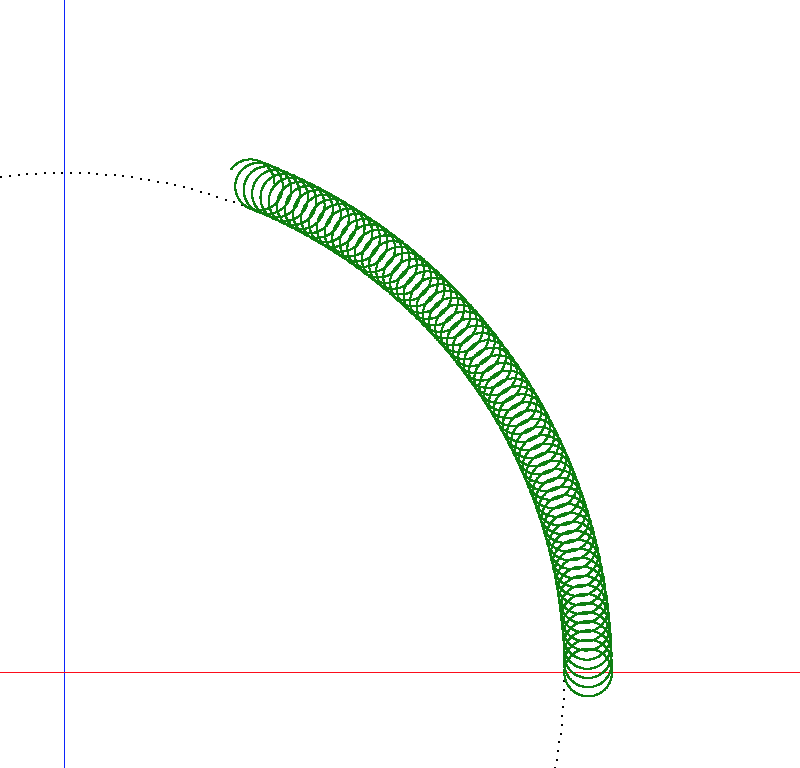
That’s not the issue - it IS working, and producing the correct results, it’s just taking forever to happen.
Here’s the “how long is it taking?” output from the run that produced the image above - after running for roughly half an hour, maybe 45 minutes:
Base circle plotted in 0:00:03.009240
Secondary circle #0(Theta=0.0) plotted in 0:00:05.397818
Secondary circle #1(Theta=0.01750190893364787) plotted in 0:00:06.001109
Secondary circle #2(Theta=0.03500381786729574) plotted in 0:00:05.211121
Secondary circle #3(Theta=0.05250572680094361) plotted in 0:00:06.006330
Secondary circle #4(Theta=0.07000763573459148) plotted in 0:00:06.069943
Secondary circle #5(Theta=0.08750954466823935) plotted in 0:00:06.001568
Secondary circle #6(Theta=0.10501145360188723) plotted in 0:00:06.001786
Secondary circle #7(Theta=0.1225133625355351) plotted in 0:00:06.984882
Secondary circle #8(Theta=0.14001527146918297) plotted in 0:00:08.784452
Secondary circle #9(Theta=0.15751718040283083) plotted in 0:00:10.118885
Secondary circle #10(Theta=0.1750190893364787) plotted in 0:00:09.911766
Secondary circle #11(Theta=0.1925209982701266) plotted in 0:00:11.011903
Secondary circle #12(Theta=0.21002290720377445) plotted in 0:00:11.609469
Secondary circle #13(Theta=0.22752481613742231) plotted in 0:00:12.007553
Secondary circle #14(Theta=0.2450267250710702) plotted in 0:00:12.032156
Secondary circle #15(Theta=0.26252863400471804) plotted in 0:00:12.004355
Secondary circle #16(Theta=0.28003054293836593) plotted in 0:00:12.020168
Secondary circle #17(Theta=0.2975324518720138) plotted in 0:00:12.715211
Secondary circle #18(Theta=0.31503436080566166) plotted in 0:00:14.619337
Secondary circle #19(Theta=0.33253626973930955) plotted in 0:00:15.966642
Secondary circle #20(Theta=0.3500381786729574) plotted in 0:00:15.666782
Secondary circle #21(Theta=0.3675400876066053) plotted in 0:00:16.498355
Secondary circle #22(Theta=0.3850419965402532) plotted in 0:00:17.682649
Secondary circle #23(Theta=0.402543905473901) plotted in 0:00:18.006286
Secondary circle #24(Theta=0.4200458144075489) plotted in 0:00:18.001633
Secondary circle #25(Theta=0.4375477233411968) plotted in 0:00:18.001407
Secondary circle #26(Theta=0.45504963227484463) plotted in 0:00:18.018168
Secondary circle #27(Theta=0.4725515412084925) plotted in 0:00:18.403419
Secondary circle #28(Theta=0.4900534501421404) plotted in 0:00:20.749675
Secondary circle #29(Theta=0.5075553590757883) plotted in 0:00:21.617934
Secondary circle #30(Theta=0.5250572680094361) plotted in 0:00:22.156216
Secondary circle #31(Theta=0.542559176943084) plotted in 0:00:22.786201
Secondary circle #32(Theta=0.5600610858767319) plotted in 0:00:23.146197
Secondary circle #33(Theta=0.5775629948103798) plotted in 0:00:23.911411
Secondary circle #34(Theta=0.5950649037440277) plotted in 0:00:24.002968
Secondary circle #35(Theta=0.6125668126776754) plotted in 0:00:24.053116
Secondary circle #36(Theta=0.6300687216113233) plotted in 0:00:24.023977
Secondary circle #37(Theta=0.6475706305449712) plotted in 0:00:25.020135
Secondary circle #38(Theta=0.6650725394786191) plotted in 0:00:25.943358
Secondary circle #39(Theta=0.682574448412267) plotted in 0:00:27.619222
Secondary circle #40(Theta=0.7000763573459148) plotted in 0:00:27.972040
Secondary circle #41(Theta=0.7175782662795627) plotted in 0:00:28.826091
Secondary circle #42(Theta=0.7350801752132106) plotted in 0:00:29.301352
Secondary circle #43(Theta=0.7525820841468585) plotted in 0:00:29.484138
Secondary circle #44(Theta=0.7700839930805063) plotted in 0:00:30.284609
Secondary circle #45(Theta=0.7875859020141542) plotted in 0:00:30.031661
Secondary circle #46(Theta=0.805087810947802) plotted in 0:00:30.054057
Secondary circle #47(Theta=0.8225897198814499) plotted in 0:00:30.331511
Secondary circle #48(Theta=0.8400916288150978) plotted in 0:00:31.485802
Secondary circle #49(Theta=0.8575935377487457) plotted in 0:00:32.684741
Secondary circle #50(Theta=0.8750954466823936) plotted in 0:00:33.616829
Secondary circle #51(Theta=0.8925973556160414) plotted in 0:00:34.467434
Secondary circle #52(Theta=0.9100992645496893) plotted in 0:00:34.701639
Secondary circle #53(Theta=0.9276011734833371) plotted in 0:00:35.328472
Secondary circle #54(Theta=0.945103082416985) plotted in 0:00:35.895306
Secondary circle #55(Theta=0.9626049913506329) plotted in 0:00:35.995629
Secondary circle #56(Theta=0.9801069002842808) plotted in 0:00:36.049598
Secondary circle #57(Theta=0.9976088092179286) plotted in 0:00:36.364255
Secondary circle #58(Theta=1.0151107181515766) plotted in 0:00:37.305495
Secondary circle #59(Theta=1.0326126270852243) plotted in 0:00:38.331148
Secondary circle #60(Theta=1.0501145360188722) plotted in 0:00:39.428820
Secondary circle #61(Theta=1.06761644495252) plotted in 0:00:39.955416
Secondary circle #62(Theta=1.085118353886168) plotted in 0:00:40.486661
Secondary circle #63(Theta=1.1026202628198158) plotted in 0:00:41.210054
Secondary circle #64(Theta=1.1201221717534637) plotted in 0:00:41.782836
Secondary circle #65(Theta=1.1376240806871116) plotted in 0:00:42.002347
Secondary circle #66(Theta=1.1551259896207595) plotted in 0:00:42.051050
Secondary circle #67(Theta=1.1726278985544074) plotted in 0:00:42.106717
Secondary circle #68(Theta=1.1901298074880553) plotted in 0:00:43.954910
graphics.GraphicsError: Can't draw to closed window

'Cause I closed the window to deliberately crash it out.
Notice how the time to plot each circle just keeps rising? This is a consistent result after multiple trial runs. The exact numbers in the “plotted in” field vary a bit from run to run, but they show the same pattern across runs: Every time a circle is plotted, it takes longer, until I finally give up and kill it. The longest I’ve let it run (I’m not sure how long that was - several hours, anyway) got it to somewhere in the neighborhood of circle #175 +/-5. At that point, it was taking 2:46 (Yep, you read that correctly -nearly 3 full minutes, based on watching the clock and waiting for the next dot to appear) to calculate and plot EACH DOT of each circle!
Can anybody point me at where this steadily increasing time-per-dot phenomenon comes from, and/or suggest a way to avoid it? Obviously, at the start of the run, the times are reasonable, but it doesn’t take too long to get to the point where it’s pretty obvious that it’s choking on SOMETHING, but I’m too rookie in Python to figure out where/why/how to fix it. It’s not like I’m doing something that leads to runaway recursion, or something like that.
