Can we have float -> binanry as fbin and binary -> float as fnum conversion in math library?

Can we have float → binary as fbin and binary → float as fnum conversion in math library?

I am not a professional programmer,
so my code is just a raw example.

# float -> binary and binary -> float conversion
from fractions import Fraction

def fbin(x):
    a, b = int(x), Fraction(str(x)) - int(x)
    result = list()
    result.append(bin(a)[2:])
    if not b:
        result.append("0")
        return result
    bits = ''
    for _ in range(50):
        b *= 2
        if b >= 1:
            bits += "1"
            b -= 1
        else:
            bits += "0"
    result.append(bits)
    return result

def fnum(number):
    q = int(number[0], 2)
    r = sum([int(bit) * (2 ** -(idx + 1))
             for idx, bit in enumerate((number[1]))])
    return q + r
>>> fbin(1113.3)
['10001011001', '01001100110011001100110011001100110011001100110011']
>>> fnum(_)
1113.3
>>> fbin(1e+2)
['1100100', '0']
>>> fnum(_)
100.0

We can convert a float to hex with a method:

>>> 1113.3.hex()
'0x1.1653333333333p+10'
>>> (1e+2).hex()
'0x1.9000000000000p+6'

and you could convert from there into binary if you wish.

Yes, i found that also.
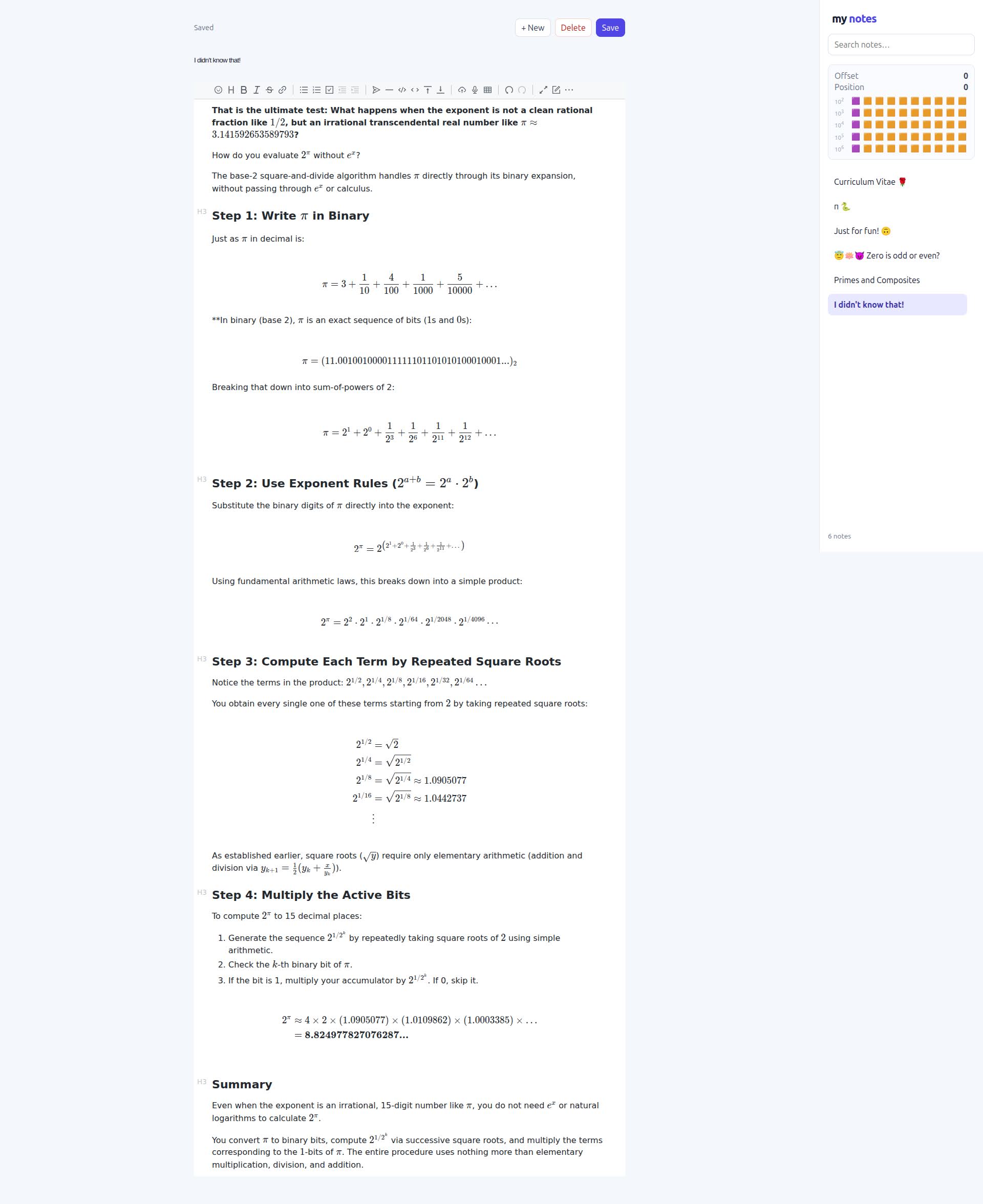
So, I’ve tried to make exponentiation in different bases, using float to binary conversion first.

So, that is my playground. I realized that there is no a simple float to binary conversion method.

That is what motivated me to ask for this feature: float to binary and binary to float conversion.

from fractions import Fraction

def fbin(x):
    a, b = int(x), Fraction(str(x)) - int(x)
    result = list()
    result.append(bin(a)[2:])
    if not b:
        result.append("0")
        return result
    bits = ''
    for _ in range(50):
        b *= 2
        if b >= 1:
            bits += "1"
            b -= 1
        else:
            bits += "0"
    result.append(bits)
    return result

def fnum(number):
    q = int(number[0], 2)
    r = sum([int(bit) * (2 ** -(idx + 1))
             for idx, bit in enumerate((number[1]))])
    return q + r

def root(x, k, tolerance = 1e-15):
    a = m = 2.0
    while abs(m) > tolerance:
        m = (a ** k - x) / (k * a ** (k-1))
        a -= m
    return a

def exp(base, x):
    if x < 0: return 1 / exp(base, -x)
    exponent = fbin(x)

    q = 1
    for idx, bit in enumerate(exponent[0][::-1]):
        q *= base ** (int(bit) * (2 ** idx))

    r = 1
    for bit in exponent[1]:
        base = root(base, 2)
        r *= base ** (int(bit))

    return q * r

def nexp(x, tolerance = 1e-15):
    if x < 0: return 1 / nexp(-x)
    prod = a = i = 1
    while abs(prod) > tolerance:
        prod *= x / i
        a += prod
        i += 1
    return a

def ln(x, tolerance = 1e-15):
    a = m = 1.0
    while abs(m) > tolerance:
        t = nexp(a)
        m = 2 * (t - x) / (t + x)
        a -= m
    return a

def log(base, x, tolerance = 1e-15):
    a = m = 2.0
    scale = 2 / ln(base)
    while abs(m) > tolerance:
        t = exp(base, a)
        m = scale * (t - x) / (t + x)
        a -= m
    return a

if __name__ == "__main__":
    pass
>>> fbin(1113.3)
['10001011001', '01001100110011001100110011001100110011001100110011']
>>> fnum(_)
1113.3
>>> exp(2, 10)
1024.0
>>> log(2, 2 ** 10)
9.999999999999993

Hmm, if you’re going to express pi as an infinite series of rational numbers, there are far more logical ones to use than its binary expansion. Also, you’re not really going to get anywhere much by starting with a floating point representation (with only 53 bits to work with). But in any case, the main value of what you’re doing here IS the writing of the code; you’re learning by creating this. Also, I think you’re perhaps seeing exactly how poor Gemini can be as a learning tool.

So, I am using Python to test some of mine ideas.

me@amadeus:~$ python3 -q # 🐍
>>> def sin(x):
...     prod = a = 1
...     for i in range(1, 30):
...             prod *= x / i
...             if not i & 1: continue
...             prod *= -1
...             a += prod
...     return 1 - a
... 
>>> x = 0
>>> for _ in range(3):
...     x += sin(3 + x)
... 
>>> x
0.14159265358979323 ❤️‍🔥
>>> 
me@amadeus:~$

I am not a professional programmer,
I am just playing around, because I am curious to see,
how code is made?

me@amadeus:~$ python3 -q # 🐍
>>> def exp(x):
...     prod = a = 1
...     for i in range(1, 30):
...             prod *= x / i
...             a += prod
...     return a
... 
>>> def ln(x):
...     a = 0
...     for _ in range(1, 30):
...             a -= 1 - x / exp(a)
...     return a
... 
>>> def sin(x):
...     prod = a = 1
...     for i in range(1, 30):
...             prod *= x / i
...             if not i & 1: continue
...             prod *= -1
...             a += prod
...     return 1 - a
... 
>>> x = 3
>>> for _ in range(3):
...     x += sin(x)
... 
>>> x
3.141592653589793
>>> 
>>> exp(1/x * ln(x))
1.4396194958475905
>>> x ** (1/x)
1.4396194958475907
>>> 
>>> exp(x * ln(x))
36.46215960720795
>>> x ** x
36.4621596072079
>>> 
>>> exp(1/3 * ln(2))
1.2599210498948732
>>> 2 ** (1/3)
1.2599210498948732
>>> 
me@amadeus:~$

So, the next what I’ve tried, is to use exponentiation trough different base conversion,
therefore the one of method needed float to binary and binary to float conversion.

So, that is what motivated me to ask for this feature request:
binary to float and float to binary conversion.

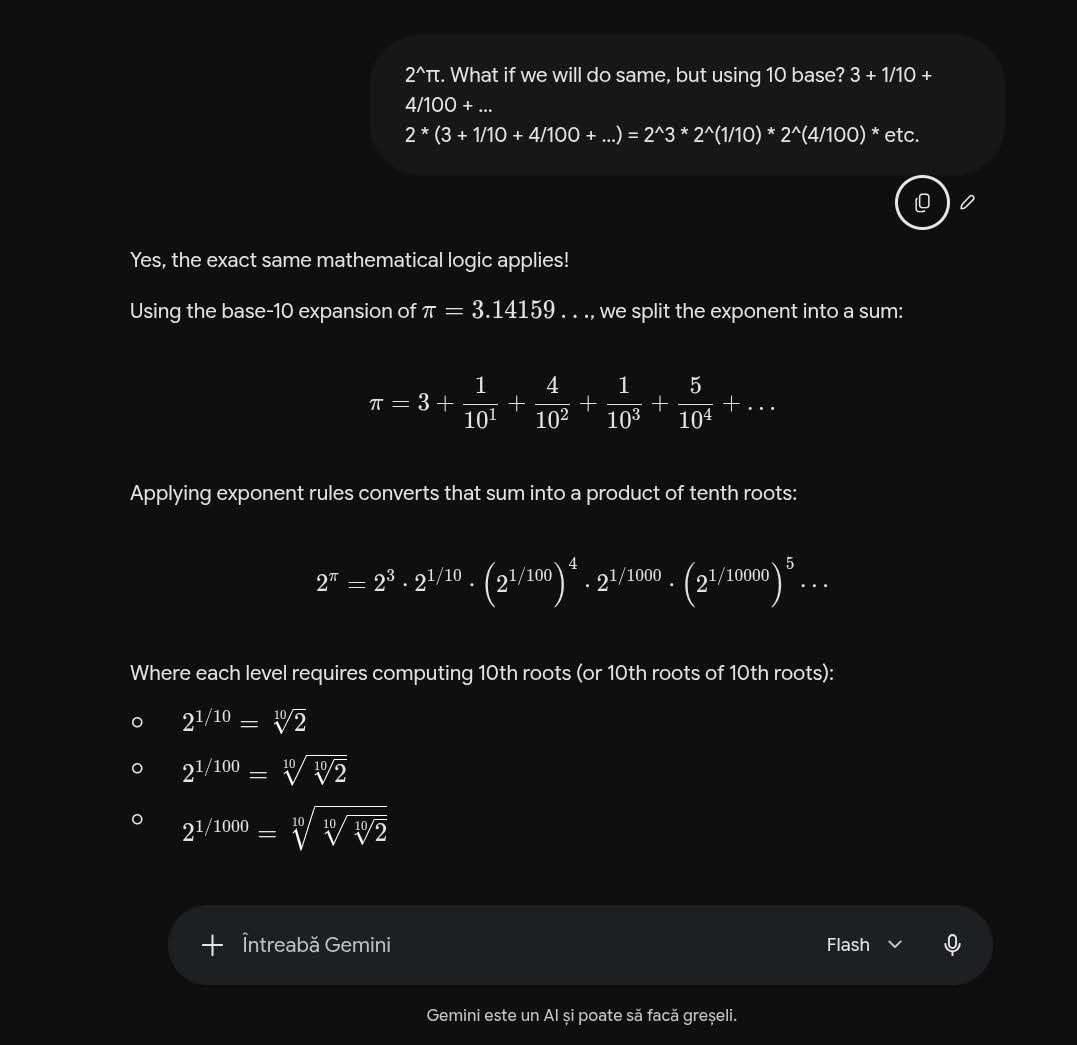
I did also exponentiation using decimal base:

def root(x, k, tolerance = 1e-15):
    a = m = 2.0
    while abs(m) > tolerance:
        m = (a ** k - x) / (k * a ** (k-1))
        a -= m
    return a

def exp(base, x):
    a, b = int(x), x - int(x)
    result = base ** a
    for i in f'{b:.15f}'.split(".")[1]:
        base = root(base, 10)
        result *= base ** int(i)
    return result
from math import pi as π

print(root(27, 3))
print(log(2, 8))
print(exp(2, log(2, 10)))

print(exp(π, 1/π))
print(π ** (1/π))

print(exp(π, π))
print(π ** π)

print(log(2, 2 ** 10))
print(exp(2, 10))

/home/me/Pycharm/WelcomeScreen/.venv/bin/python script.py 
3.0
3.0
10.0
1.439619495847591
1.4396194958475907
36.46215960720791
36.4621596072079
10.0
1024.0

Process finished with exit code 0
The very best way to see how code is made is to make code :slight_smile: Figure out what you need, and then write it! This is far better than having specific tools handed to you.

Yes, I am agree. But we have just binary conversion just for integers.
Why not to have binary to float and float to binary conversion too? :upside_down_face:

Python aims to be “batteries included,” and for learning, experimentation, and teaching numerical computing, having a clean, built-in bridge between binary strings and floats would save a lot of reinventing the wheel!