i want to use pygame.but after i install pygame. i can’t [import pygame] erorr:ModuleNotFoundError
windows11
python3.13
pygame2.6.1
(use vscode)
The commonest cause of this kind of problem is that you have more than one Python installed, and your pip install has chosen one of them, while you are running a different one. It will depend what commands you used to install pygame and what command you use to run your program.
On Windows, there is a launcher called py, which it is probably best to use, but it is important you use it both to install packages and to run the code where you expect to import them.
I have several versions on my system, so I can demonstrate the issue:
PS vsj> py -V
Python 3.14.0
PS vsj> py -m pip list
Package Version
------- -------
pip     25.2
That is the python from the Microsoft Store (I think). But I also have on my path an older installation:
PS vsj> python -V
Python 3.8.10
PS vsj> pip list
Package    Version
---------- -------
appdirs    1.4.4
distlib    0.3.1
filelock   3.0.12
pip        21.1.1
setuptools 56.0.0
six        1.15.0
virtualenv 20.2.2
You see that one has a different set of installed packages. I used the pip command to install six, but if I try to import six in py, it fails:
PS vsj> py
Python 3.14.0 (tags/v3.14.0:ebf955d, Oct  7 2025, 10:15:03) [MSC v.1944 64 bit (AMD64)] on win32
Type "help", "copyright", "credits" or "license" for more information.
>>> import six
...
ModuleNotFoundError: No module named 'six'
Other useful clues can be got by asking Python itself, for example, ask where it is loooking for packages:
>>> import sys
>>> sys.path
['', '...\\Python314\\python314.zip', '...\\Python314\\DLLs', '...\\Python314\\Lib', '...\\Python314', '...\\Python314\\Lib\\site-packages']
If you can’t see pygame in the same site-packages folder python is actually using, then you have installed it somewhere else. This is why the pygame docs have you install it with py -m pip install pygame.
If you are using IDLE or a more complex IDE, then you must make sure you and it are doing the same thing. VSCode would much prefer to use a virtual environment, which is a sort of walled garden where you/it can install things without affecting the main installation. (It is worth learning to use these.) VSCode is right to do it, but it means that what you do at the shell prompt won’t see what you installed in the virtual environment.
It’s hard to be sure about someone else’s system, so it’s best if you poke around yourself. I’ve been trying to teach you how to figure it out, but if you’re still stuck, come back with more information and someone will try to guess.
3 Likes
When using the launcher, py -0 lists the available pythons
PS C:\Users\Tim> py -0
 -V:3.12 *        Python 3.12 (64-bit)
 -V:3.11          Python 3.11 (64-bit)
To use a specific version,
PS C:\Users\Tim> py -3.11
Python 3.11.13+ (heads/3.11-dirty:c96ab19ae46, Jun 15 2025, 13:13:20) [MSC v.1944 64 bit (AMD64)] on win32
Type "help", "copyright", "credits" or "license" for more information.
>>>
You should use py -m pip to install things with pip to make sure you’re using the pip associated with the version of python you’re using. e.g.
PS C:\Users\Tim> py -3.11 -m pip list
Package    Version
---------- -------
pip        24.0
pygame     2.6.1
setuptools 79.0.1

[notice] A new release of pip is available: 24.0 -> 25.3
[notice] To update, run: C:\Users\Tim\AppData\Local\Programs\Python\Python311\python.exe -m pip install --upgrade pip


PS C:\Users\Tim> py -3.12 -m pip list
Package Version
------- -------
pip     25.0.1
You should also look into virtual environments.
2 Likes
& C:/python/python.exe c:/python/a.py
File “”, line 1
& C:/python/python.exe c:/python/a.py
^
SyntaxError: invalid syntax
why i get this error
& C:/python/python.exe
File ““”, line 1
& C:/python/python.exe
^
SyntaxError: invalid syntax
why i get this error
Is “&” your shell prompt?
idk what is shell prompt
BLUF: Spend some time reading the docs. Start with
Python Setup and Usage
Where are you running python from? How did you install it?
On Windows, python can be run from a cmd or powershell shell, or from IDLE.
cmd prompt looks like this
Microsoft Windows [Version 10.0.26100.7623]
(c) Microsoft Corporation. All rights reserved.

C:\Users\Tim>
Powershell prompt looks like this:
Windows PowerShell
Copyright (C) Microsoft Corporation. All rights reserved.

Install the latest PowerShell for new features and improvements! https://aka.ms/PSWindows

Loading personal and system profiles took 4927ms.
PS C:\WINDOWS\system32>
IDLE usually comes with a Windows install. My python comes with conda, so to get IDLE, I need to invoke it with python -m idlelib.
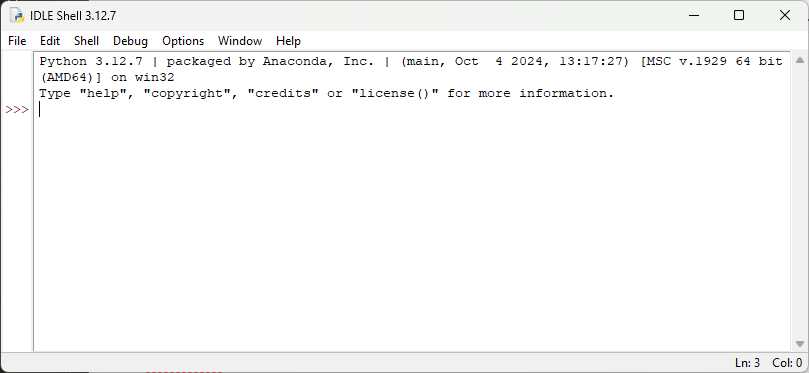
There are other IDEs. Personally, I tend to use PyCharm, or Spyder.
As to
I don’t understand where the ampersand “&” is coming from. Is python installed in C:\python ? (Bad place BTW.) I doubt a Windows installer did that.
What is in a.py?