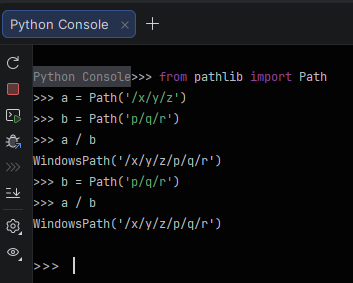
I just spent fifteen minutes debugging a problem in my code, it boils down to the fact that when you concate nate two paths, if the latter has a leading slash, the concatenation is not done and the latter path is taken, i.e.
>>>
>>> from pathlib import Path
>>>
>>> a = Path('/x/y/z')
>>> b = Path('p/q/r')
>>>
>>> a / b
PosixPath('/x/y/z/p/q/r')
>>>
>>>
>>> b = Path('/p/q/r')
>>>
>>> a / b
PosixPath('/p/q/r')
>>>
I think this should not happen and the path should just eliminate the leading slash in the next path, or at least I would rais an exception.
In Windows that b is not absolute. If you try something like r'C:\p\q\r', it should keep b.
Another case to take into account is a being a PosixPath and b being an absolute PureWindowsPath. In that case a/b also doesn’t just keep b. I think because it first interprets b as a path of the same type as a, and there it is not absolute.
/ is the root on Posix. Shouldn’t appending /foo to another path error, or does Windows need to do that for some cursed reason?
Regardless, eliminating leading slashes is a bad idea - that’s not a redundant os.sep, that’s a crucial piece of information.
Path.joinpath behaves the same. I’m not suggesting a breaking change should be made.
Is there demand for a safe method (or optional args to joinpath) that doesn’t discard the leading slash and errors? Or for a way to append a root path ignoring its root, always producing a child path? I realise I’m interchanging path to mean both pathlib.Path and ‘string of a posix file path’.
Everything to do with Windows paths is cursed, so, yes, it is. The path "C:/spam" is absolute; the path "C:spam" is not, and the path "/spam" is not. Or rather, they’re partly absolute. Awesome, isn’t it?
I’ve been bitten by Windows Paths being case insensitive before, and keeping their original name even when renamed to switch the case of a few characters.
Reminder: “root” has eleventy thousand meanings in this discussion.
In some comments, the word “root” is the equivalent of the property pathlib.PurePath.root.
In other comments, the word “root” is the equivalent of the property pathlib.PurePath.anchor.
Did I mention pathlib.PurePath.drive?
posix-style and Windows-style paths are the most common types, but UNC and URI add to the complexity.
The character,\, has umpteen meanings, and the most important meaning in the context of Python: \is the escape character. Which is why you might see a “drive” that looks like this:
I prefer Windows to posix, but Microsoft should have fixed the backslash problem with Windows NT 5, aka Windows 2000. It would have been a difficult and anger-filled transition, but the problem is Windows syntax, not posix.
After 35 years, I still read the docs at least once a week. SS64.com is usually the only thing I need for CMD. (I’m not affiliated with SS64.)
FWIW, I very much like pathlibdespite being allergic to object-oriented programming.
Think of the scenario where you don’t have literal path strings and instead have multiple path objects. One is telling you where the program root/current directory is (say derived from Path(‘.’) and the other is from a user input.
You ask the user to input a path to a file, and they have the option of specifying that path relative to the current working directory or as an absolute path from root.
Since you don’t know how they will input that path, and both options should be valid, raising an exception when then joining that path to the current root would be bad.
script_root = Path(__file__).parent
# /home/scripts

user_dir = Path(input("Enter path: "))

#Relative
user_dir = Path('path/to/directory')
final = script_root / user_dir
# final = Path('/home/scripts/path/to/directory')

#Absolute
user_dir = Path('/home/scripts2/path/to/directory')
final = script_root / user_dir
# What would final be if the leading / is removed?
In that second case, assuming the input isn’t absolute would create a copy of the path from system root starting at the script root.
As others have said here, it’s best to think of Path joining as a sequence of instructions on where to go next, with os.sep being the delimiter between path components. Since the second path is anchored to system root, it means the joined path is now going back to system root before continuing to the next part.
Posix just defines system root using a prefixed separator instead of a drive identifier, which can make it seem a bit confusing.
Pathlib has been in Python since the 3.4 release in March of 2014. A breaking change like this isn’t feasible. You can, however, roll your own StrictPath:
from pathlib import PosixPath, WindowsPath, Path
import os

_Base = WindowsPath if os.name == "nt" else PosixPath

class StrictPath(_Base):
    def __truediv__(self, other):
        if Path(other).is_absolute():
            raise ValueError(f"Invalid join of absolute path {other} to {self}")
        return super().__truediv__(other)
(I don’t have convenient access Windows so this is only tested on Mac/Linux).
 (from the OPs original post)