IDLE proposal: Optional background shading for indentation levels

I am currently learning Python using IDLE, and I would like to propose an optional visual aid that could make Python’s indentation structure easier to understand and debug.

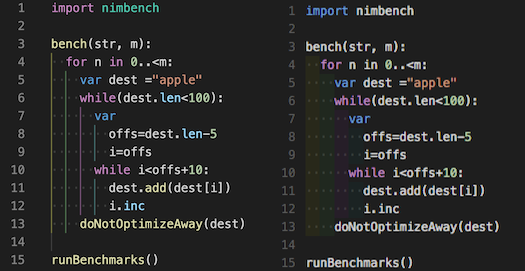
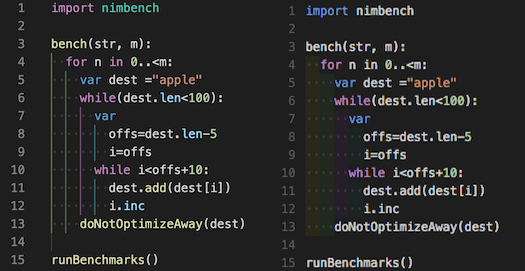
The feature would apply a subtle background shade to each indentation level. When code enters a nested block—such as an if, while, for, or function—the background shade would change. When the indentation moves back to the left, that shaded area would end.

This could make it immediately clear which lines belong to each block. For example, a line accidentally placed outside an elif block would visibly appear in the wrong shaded area.

I understand that editors such as VS Code and PyCharm offer indentation guides or extensions with related features. However, thin vertical guides may still be difficult for some users to follow. Subtle background scope shading could provide a clearer alternative, particularly for beginners and users with visual or learning difficulties.

This would be an editor-only display feature. It would not add anything to the Python file, change Python’s syntax, or affect how the program runs.

Possible settings could include:

  • Off
  • Indentation guides only
  • Background scope shading
  • Highlight the current block only

From my own experience as a learner, I can spend approximately 30% of my coding and debugging time trying to locate indentation errors rather than developing the actual program logic. A single line placed a few spaces too far left or right can cause a syntax error or make the program behave incorrectly, while being difficult to spot visually.

Experienced programmers often keep blocks short by dividing programs into functions. However, beginners are still learning how and when to do this. An optional visual aid could help them understand block structure while developing those skills, without affecting experienced users who prefer IDLE’s existing display.

Would other IDLE users find optional background scope shading helpful? Are there technical limitations in IDLE’s editor that would make this difficult to implement?
3 Likes

This sounds like an interesting idea and it would be fun to tinker around with it.

However, the issue you mention is actually one of the design mantras of Python. The language uses indentation to force users to write simple logic (or extract the rest into separate functions).

Additionally, there might (and certainly will) be cases where there is nested indentation, how would that work then? Make the line an additional x% more opaque? When does it end?

Do you mean shade the whole part after indent or something like indent-rainbow - Visual Studio Marketplace?

I don’t think that invalidates the idea[1]. Once the coder gets experienced enough, they write less nested code naturally; beginners need help writing code and they learn how to write elegant code in the process.


  1. if that’s what you mean ↩︎

Sorry didn’t mean that to be discouraging of the idea, just exploring arguments and counter arguments and suggest refactoring code as beginners to avoid ending up in a situation where it is hard to keep track of the indentation.

I agree it would be useful even if they had a couple of indented lines for beginners

1 Like

Oh sorry, I misunderstood too.

IDLE uses the tkinter gui, which wraps tcl/tk. The editor uses the Text widget. It does not have an option to overlay spaces with non-text vertical lines or centered dots, as in the following example. (Both ideas have been proposed for IDLE and rejected as infeasible.)

indend-rainbow example

Coloring the background of blocks of spaces is possible, but as maintainer, I would not be enthusiastic. The color would be attached to each block of chars, which could expand, contract, and move, rather than to the positions. Hence lots of recoloring would be needed. But it might be easier than I initially imagine if it could be done with the current syntax coloring mechanism. But really worthwhile?

@zebi001 I cannot imagine how you spend so much time locating indent errors? Perhaps you could explain more. Like @mfile_bay, I did not understand the ‘accident’ quoted.

Are you making full use of available features? IDLE’s smart indent and dedent add and subtract blocks of indent-width chars. Use them correctly and indents are at least a proper multiple of the width.

When the cursor is moved with key presses, the column is shown at bottom right. (That clicks do not change the display is a bug.) If you know an ‘if’ indent, you can check ‘elif’ and ‘else’ indents even a page away.

The Run → Check Module option detects bad indents that are syntax errors. Options → Code Context was intended to help with semantic indent errors. But I admit it is a bit awkward. I am thinking about possible improvements.

PS. Python requires indents to avoid forcing syntax markers that are redundant when indents are used, as they tend to be even when not required.

1 Like