For some reason, I can’t import a function from another file.
I’ve tried:
# levels.py
def level():
    return 1
# main.py
from levels import *
print(level())
But it outputs an error:
root@1de6ab8b7b69:~/my-project# /bin/python3 /home/workspace/my-project/main.py
Traceback (most recent call last):
  File "/home/workspace/my-project/main.py", line 16, in <module>
    print(level())
NameError: name 'level' is not defined. Did you mean: 'eval'?
It works just fine. You probably have another module called “levels” which shadows the one you think you’re importing.
Try doing from levels import level instead of from levels import *. This should raise ImportError and show you which module python is actually trying to import from.
Please show the exact code you are executing. Your main.py file contains something else, since the error message points to line 16, but the main.py you posted only contains 2 lines.
You probably have another module called “levels” which shadows the one you think you’re importing.
It is unlikely that this is causing a problem.
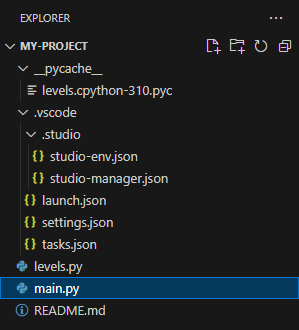
First, my project looks like this:
Secondly, from levels import level
outputs a link to this levels.py:
Traceback (most recent call last):
  File "/home/workspace/my-project/main.py", line 2, in <module>
    from levels import level
ImportError: cannot import name 'level' from 'levels' (/home/workspace/my-project/levels.py)
Your editor environment probably does have a plain old
“save-without-run” operation. If it’s got a “File” menu, see if that has
a “Save”, probably with a key binding (which would save opening the
menu).