Hello community,
I just installed the new v3.14 latest version of Python. To be honest, it has been a long time since I last performed an installation (had v3.13x from about ~1+ years ago) which did auto-updates. In any case, I distinctly remember (or maybe in a dream I suppose) that in an installation, there are two .exe versions: 1. terminal command prompt Python and 2. IDLE.
If I click the python.exe, it opens up the black command prompt type Python window. I want the IDLE which I don’t see installed.
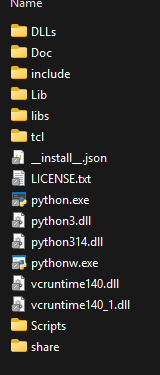
This is what was installed:
Located here:
C:\Users\me\AppData\Local\Python\pythoncore-3.14-64
Any ideas?
Note the literal location for IDLE is the Lib/idlelib directory. This directory includes several methods of starting IDLE including an idle.bat file.
IDLE and Python are next to each other in the Windows start menu when installed there. This might be what you’re recalling.
You can also start IDLE with pythonw.exe -m idlelib
Awesome!
Thank you. 
They must have moved things around because I am almost certain that they were in the same folder in the previous version.
I doubt it since that isn’t the case in Python 3.12 or 3.13 and if that kind of executable file existed it’d normally be in the Scripts directory (like for example: pip) which existed as far back as Python 2.7.
But what you’ve described does match exactly with how the file shortcuts are arranged in the Windows start menu with IDLE being adjacent to the regular Python command line.