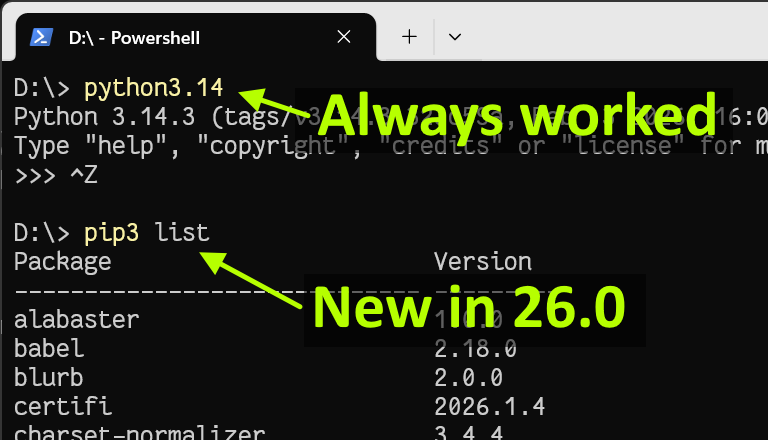
I’ve just released the next install manager update, the first (hopefully only) of 2026. Automatic updates should start within the next 24 hours.
Global script entry points
With this release, Python install manager will now generate global shortcut executables for installed packages that register through their entry_points.txt file. For users who add the global shortcuts directory to their PATH (as prompted on first run, and reminded on every install), this will make any globally installed packages available as well, without having to add an interpreter-specific directory to PATH. Primarily, this will handle issues with pip.exe not being present immediately after install.
It’s important to note that the install manager can only add shortcuts when it is doing installs, and so packages mostly won’t have shortcuts immediately on install. Users need to run py install --refresh (or another install) to get them. My hope is that one day installers (such as pip) will learn to run this command themselves, but until then, users will just have to get used to it - short of adding a task to constantly scan their hard drive, there’s no way for us to know about new package installs. (My actual hope is that people will use virtual environments instead of global installs, but feedback so far has shown that many won’t.)
Default Python install for Windows
One of the promises in the original proposal was that the Python install manager would integrate nicely with the built-in python.exe redirector that comes with Windows. With this release, after a short period to demonstrate stability, we’ll be getting that redirector updated to refer to the install manager (it’s currently still on the last 3.13 release). This should result in over 10K new installs per day, which means we will likely hear more feedback, but I think we’re ready for it.
Minor changes in this release
authenticated proxy servers now auto-logon when the OS knows the credentials
shebang lines in scripts may now choose the version for automatic installs (e.g. if you py exec my-script.py and it contains #! python3.13 but you don’t have 3.13 installed)
shebang lines won’t cause pyw/pythonw windowed launchers to display consoles (e.g. if you didn’t specify #! pythonw as the shebang)
Feedback
All feedback and issues can come to the python/pymanager repository.
I used the new install manager for the first time recently. I miss having a pip executable. I know we generally prefer python -m pip on windows but pip is so embedded in docs, etc.
Is there an option to get a pip executable? (I’ve thought about making a simple bat file called pip that forwards to python -m pip but figured I’d ask here)
Did you use the current (26.0) release that’s announced in this post? And did you read the bit of the post where I mentioned that it now creates the pip command (if you’ve enabled global commands)?
If you did, then you may have hit a bug, so I’d suggest running py install --refresh and grabbing the log file from your %TEMP% and filing it at python/pymanager.
Just published 26.1 with a few bug fixes, most notably a security fix (CVE-2026-5271) for poorly generated script wrappers that would let the CWD take precedence over the installed package.
Second most notably, and likely to be of more interest, is that a python3 shebang is now interpreted as “use my default version” rather than “use the latest ‘3’ version”. This makes it consistent with the python3.exe command.[1]
Download page on python.org, though as usual, virtually everyone should get the update automatically within the next day or two.
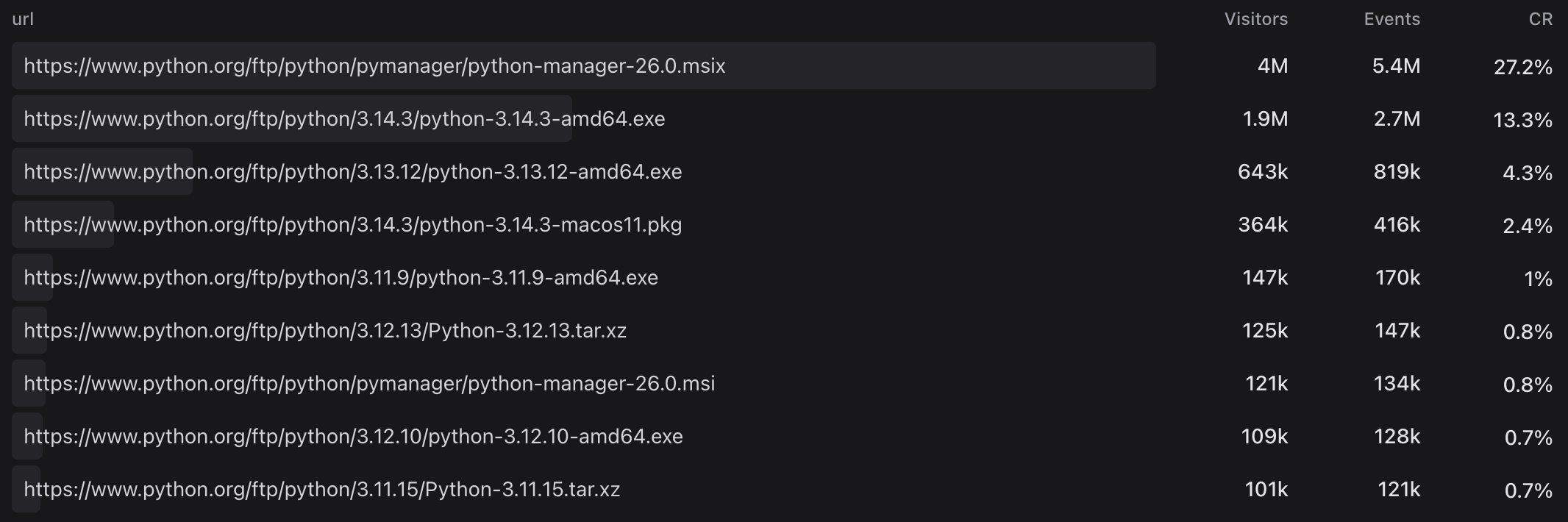
And since I’m posting, here’s the data from the Microsoft Store over the last 30 days (I think this will include winget, but won’t include downloads from python.org):
Though not the generated python3.exe alias, which links to the default at the time it was generated. This will only matter for people who install runtimes and then remove the install manager, at which point there’s no way to change “the default” anyway. ↩︎
as a remark, on my Windows PC, if I open a Python file from VisualStudio Code, and no python is registered, it proposes to install it via astral.uv. if I do “open with” from the explorer, it will look in the Microsoft store instead. it installed an un-signed uv.exe binary on C:\Users\me\.local\bin
Apparently the VSCode “The Python Extension (by Microsoft)” does this. it also installed uvw.exe and uvx.exe which are poorely rated on virustotal.com