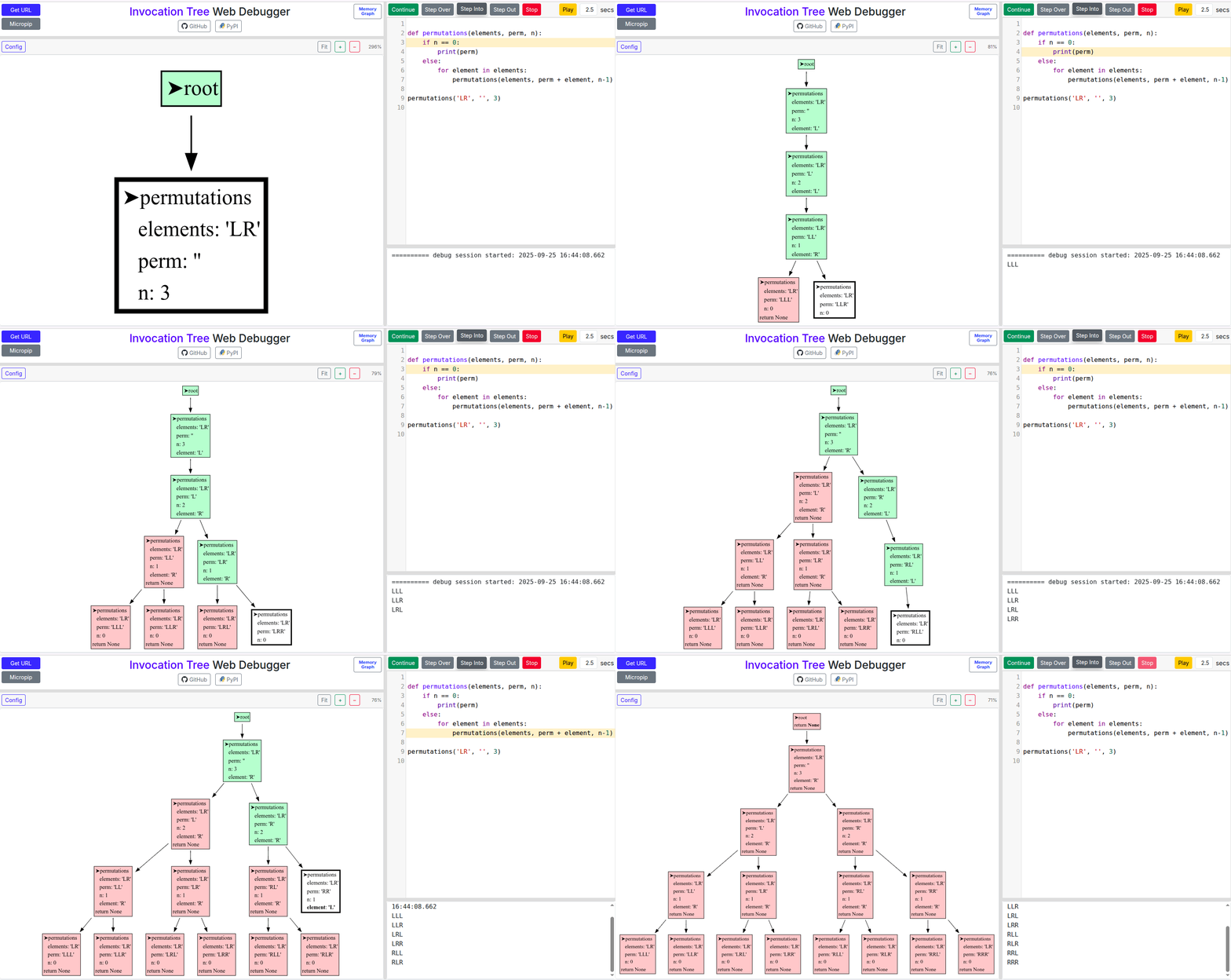
I’ve been working on invocation_tree, a Python package designed to visualize the Python call tree in real time. It’s main purpose is to help explain recursion, a concept beginners often struggle with. You can find my recursion explanation here. I hope the visualization gives an intuitive representation of the depth-first nature of recursion as the learner steps through his/her program, either in their favorite IDE, or in the Invocation Tree Web Debugger. See this live Quick Sort demo in the Web Debugger.
I’d love to hear your thoughts on its utility and any suggestions for improvement. If you have a moment to try it or share your perspective, I’d greatly appreciate it.
Another question: would it be possible to (for example) annotate lines/statements/functions with a comment (similar to `# noqa`, perhaps) that your tool would then either collapse or hide altogether?
Example code:
import math
from collections import namedtuple as T
import itertools as IT

Point = T("Point", "x y")
Sol = T("Sol", "delta pair")

def bruteforce(points):
    return min(Sol(math.hypot(a.x - b.x, a.y - b.y), (a, b)) for (a, b) in IT.combinations(points, 2))

def closest_pair(X, Y):
    if len(X) <= 3:
        return bruteforce(X)
    pivot = len(X) // 2
    Xl = [p for (i, p) in enumerate(X) if i < pivot]
    L = set(Xl)  # expected O(1) lookup
    Xr = [p for p in X if p not in L]
    Yl = [p for p in Y if p in L]
    Yr = [p for p in Y if p not in L]
    OPT = min(closest_pair(Xl, Yl), closest_pair(Xr, Yr))
    line = X[pivot].x
    S = [p for p in Y if abs(p.x - line) < OPT.delta]
    if len(S) > 1:
        OPT = min(OPT, min(bruteforce(IT.islice(S[i:], 6)) for i in range(len(S) - 1)))
    return OPT

def closest(points):
    X = sorted(points)
    Y = sorted(points, key=lambda p: (p.y, p.x))
    return closest_pair(X, Y)

import random
N = 32
P = [Point(round(random.random() * 100, 2),round(random.random() * 100, 2)) for _ in range(N)]
delta, (p1, p2) = closest(P)
print("delta:", round(delta, 3))
In this code I first create (in this case) 32 random points, and they take up 32 boxes, then I sort them, which seems to be another bunch of boxes, before the actual code starts running. I would like to ignore everything until the actual recursive function is called.
you can hide/ignore functions, see the “Config” and documentation.
In your example the debugger doesn’t step over list comprehension nicely. I thought I’d fixed that, but apparently there is still a problem that I’ve to look into. This will take some time as I’m busy now. I also have some future work in mind to make it scale better for larger programs, but for now this is what it is. Half way 2026 I should have time for further development.