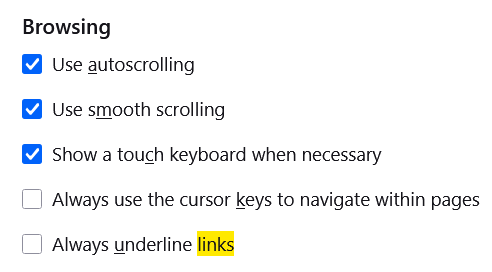
I think underlines on code identifiers in body text don’t give as much distinguishing information given that identifiers often have underscores in them, that they already are monospaced, and that in body text almost all occurrences of code identifiers are as links — such that when you see an identifier in main body, you would assume it links to another module/class/function rather than not.
Perhaps besides putting the line at a lower position, the same CSS rules can also be used to tone down the underline as well.
As long as we follow the standard practices of the internet[1] colourblind people can configure their browser to always underline links. And it should be possible to configure that to be the default for mobile devises (for the touchscreens where you can’t hover) too.
I’m not expert enough on html and css to know exactly what that means ↩︎
Underlines aren’t just for colour blind people, they’re also important for people with low vision, and some of us are getting older which can come with worsening vision. Accessibility is for everyone and should be the default (see: “curb cut effect”).
For the best curb cut effect, it would seem logical to me that it is best to use css and html the way they have been “designed”. Which the Python documentation website largely does already as far as I can tell, by encoding links as
This ensures that anyone with any special need whatsoever (whether due to disability or otherwise) can configure their browser to display the links in the way that suits their needs.
I would assume that anyone for who underlined hyperlinks are useful has already configured their browser to underline all hyperlinks. Because it would be useful to them when reading on the bbc, economist.com, github, wikipedia, etcetera.
Making these “special needs” specs part of the default on particular websites when they aren’t on others, makes life more difficult because it makes things less predictable.
Because the Python website got the core correctly, anyone with the particular special need described by OP can configure their browser to strip the underlines from hyperlinks.
I’d expect such a configuration to have occasional nasty unintended side effects, because people making websites should be aware that readers might add underlines to hyperlinks (that’s a standard accessibility setting on modern browsers) but they’re unlikely to think about readers who explicitly remove such formatting. You could make the rule specific to the python documentation website (I think) but that comes with its own form of tedium.
Firefox still offers the possibility of inserting your own css, and I confirmed it works as it’s supposed to by inserting a { text-decoration: underline !important } into userContent.css. (The result is distracting & ugly for some websites, but works well for the documentation pages we were discussing.)
Firefox also offers the option as a setting.
But for Brave and Opera (and most other chromium-based browsers I would assume) you don’t have the option of inserting your own css anymore, at least unless you’re willing to trust an unverified browser extention that may, you’re warned, “Read and change all data on all websites”.[1] Or are able to write your own extension.
Neither Brave nor Opera offers underlining of hyperlinks as a setting either. (As far as I can tell.)
The result of a conflict of interest, due to Google being more profitable when we have less choice in how we interact with the internet perhaps? ↩︎
*nod* I’m reminded of how, in the early days of Rust, a sentiment I saw repeated and picked up for my own use was that the language syntax should not assume the presence of an IDE.
An IDE is Browser features are an enhancement, not a crutch to be used to “go home early on Friday” when doing the legwork for UI/UX design. The more work you put into designing the base function, the higher the ceiling for what a user’s specific browser features can do to improve their experience.
This topic started me down a path of eliminating excessive links in the Python docs. I started out by writing a linter that could find and correct references that shouldn’t be links. Then I adapted it as a Sphinx extension that unlinks those references during the build without needing to change the .rst source files.
It’s very subjective, but I find that having the same “element” displayed differently in a given paragraph hinders comprehension. For example if the first occurrence of str is blue and underlined, and the second one is black and not underlined, my brain has a harder time to consider the two as the same object/reference. Maybe I’m too used to my IDE’s syntactic coloration ? Thus, even if too many links is a problem, different style for the same element is also a problem. Given the other reactions in this thread, maybe I’m the minority here?
The real issue I see here is that the xrefs aren’t appropriately prefixed with ~ for some reason, meaning object is repeated over and over doubling the length of each link and looking much more repetitive and distracting. The fact that the actual dunders are documented on object is mostly an implementation detail and distracts rather than add clarity here, and in most other places as well. Furthermore, the fact that they are linked makes it generally less vital to fully qualify names in the text referring to them, since that information is encoded in the link. In fact, it might even be viable to go so far as to always add ~ to object.__dunder__ links via @nedbat 's Sphinx extension, at least when the link is not suppressed.
That’s great, Ned! I think we may have discussed some kind of Sphinx extension like that which would auto-suppress self-links and multiple links within the same context, like that when we first hashed out the style guide on this, and I may have even played around with prototyping something like that but (like many things) I never got around to actually implementing it for real. Good on yah for making it happen!
For now, I went ahead with a PR, python/cpython#145436, to not show the object prefix in these cases, for the reasons mentioned above. Also, for consistency and given peoples’ preference for crossrefs when helpful, I’ve also selectively added xref links to a handful of other instances of these dunders elsewhere in this doc, where there wasn’t already a linked reference anywhere nearby.