In both tkinter to, ttk’ text and entry, some words in the Myanmar Unicode text are incorrect. ? is displayed. For example,မောင်အောင် displayed as မေ?င်အေ?င်.
How to fix?
In both tkinter to, ttk’ text and entry, some words in the Myanmar Unicode text are incorrect. ? is displayed. For example,မောင်အောင် displayed as မေ?င်အေ?င်.
How to fix?
Hi @PhoeKhwar-gh and welcome.
This group is for typing of Python expressions by annotations, e.g. def f(n: int) -> str. Your question may be better placed in Python Help.
For what it’s worth, when I copy your text to my Python interpreter, it displays all characters as in your text. Typically, question marks get displayed if the font doesn’t support (so operating system level, not Python). Perhaps changing the font helps.
(I’ve moved this to the Help category)
What platform are you running your app on - does the Font being used support those code points?
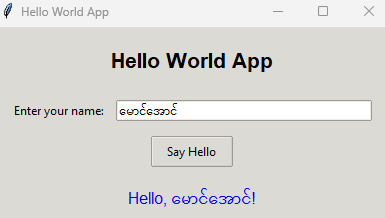
I don’t see those question marks in this example (Windows 11, Python 3.13.5):
A (not particularly minimal) Hello world tkinter ttk app from Deepseek
import tkinter as tk
from tkinter import ttk

def say_hello():
    """Function to display a greeting message"""
    name = name_entry.get() or "World"
    greeting_label.config(text=f"Hello, {name}!")

# Create the main window
root = tk.Tk()
root.title("Hello World App")
root.geometry("400x200")
root.resizable(True, True)

# Apply a theme (optional - makes it look more modern)
style = ttk.Style()
style.theme_use('clam')  # Other options: 'alt', 'default', 'classic'

# Create and configure the main frame
main_frame = ttk.Frame(root, padding="20")
main_frame.grid(row=0, column=0, sticky=(tk.W, tk.E, tk.N, tk.S))

# Configure grid weights for resizing
root.columnconfigure(0, weight=1)
root.rowconfigure(0, weight=1)
main_frame.columnconfigure(1, weight=1)

# Create widgets
title_label = ttk.Label(main_frame, text="Hello World App",
                       font=("Arial", 16, "bold"))
name_label = ttk.Label(main_frame, text="Enter your name:")
name_entry = ttk.Entry(main_frame, width=20)
greet_button = ttk.Button(main_frame, text="Say Hello", command=say_hello)
greeting_label = ttk.Label(main_frame, text="Hello, World!",
                          font=("Arial", 12), foreground="blue")

# Arrange widgets using grid layout
title_label.grid(row=0, column=0, columnspan=2, pady=(0, 20))
name_label.grid(row=1, column=0, sticky=tk.W, padx=(0, 10), pady=5)
name_entry.grid(row=1, column=1, sticky=(tk.W, tk.E), pady=5)
greet_button.grid(row=2, column=0, columnspan=2, pady=10)
greeting_label.grid(row=3, column=0, columnspan=2, pady=10)

# Set focus to the entry widget
name_entry.focus()

# Bind Enter key to the say_hello function
name_entry.bind('<Return>', lambda event: say_hello())

# Start the main event loop
root.mainloop()