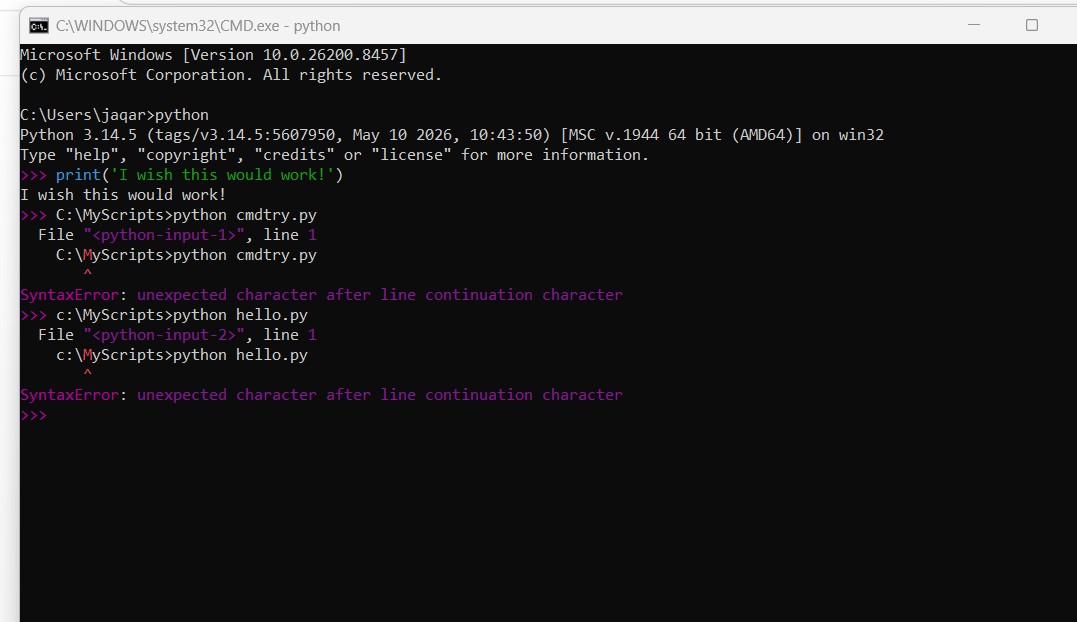
Good Morning. My name is Jacqueline. I live in England. I am a brand new learner of both coding and Python. I have spent far too many hours trying to sort a problem with my understanding of Python. Until I resolve it I cannot move on. Let me explain. I have downloaded the latest version of Python 3.14.5 and done some basic coding - 8 + 4 and print (‘Hello World!’) and they seem to work - I used the CMD from Winkey + R - starting python from there (it gives C:\Users\myname> I then type python and it brings me to Python 3.14.5; on the top of the window it shows WINDOWS\System32\CMD.exe - python.
I used Windows Notepad to create the Hello World! code.
I subsequently saved the coding to a file and this is where my problem is.
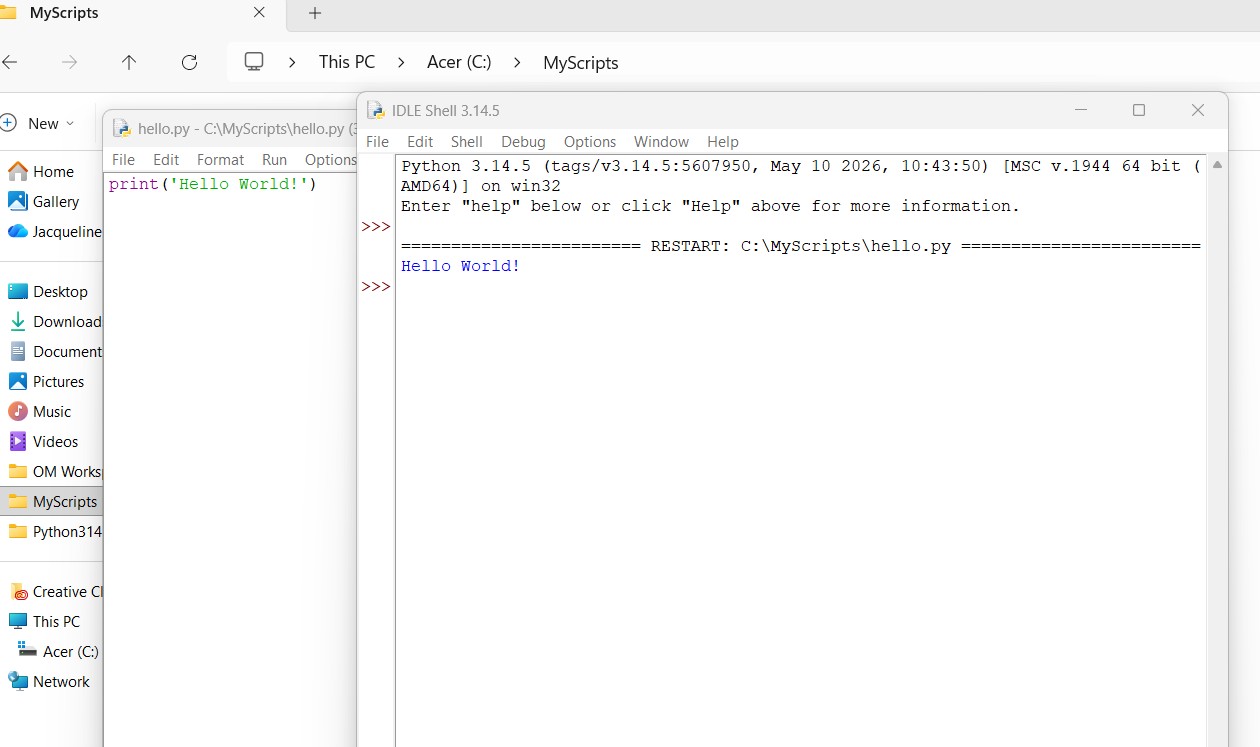
I created a new folder in C: as MyScripts.
I saved it in C:\MyScripts as hello.py it states it is an UTF - 8 encoded file
If I try to retrieve it (as is given in the Python In Easy Steps 3rd edition) - in the cmd.exe window with python active it shows an error message
this message is SyntaxError: unexpected character after line continuation character.
the M of c:\Myscripts is highlighted in red
If I use the IDLE Shell - open the file - it goes to Edit Window I then run and run module and it works in the IDLE Shell. If I go back in the file and edit it and save and run it through Shell again it works.
It will not work in cmd.exe > python.
I hope this makes sense.
I apologise as I need to ask something more after this.
Thank you.
I have created a screen shot and saved it.
Can I ask where am I going wrong in my understanding.
You say “in the cmd.exe window with python active”. Do you mean at the Python prompt “>>>”?
The Python prompt is for interactive use, not for running a program. If you’re just typing the path to the file at the Python prompt, then, yes, it’ll complain, because a file path is not a Python command.
Look for “IDLE” on your machine; press the Windows key and type “IDLE” to find it. That’s much better for programming than Notepad!
You might also want to have a look at EditPad (the Lite version is free) or Notepad++. They both support syntax colouring.
Hello Matthew. Thank you for your reply. Apologies as I have poor typing skills and make lots of typo errors. When I first tried it I used the Winkey + R and cmd option that brought me to the Windows given as above. I have done some further reading and now know I can use the command in the Windows start up it brings me to a command prompt.
I have tried that now using the word Python after the C:\User\myname>
That brings me to the active command prompt window.
It is showing the >>> and the bar is flashing.
The file I created is working in IDLE if I use the Run, Run Module.
However, I have entered C:\MyScripts hello.py in the Command Prompt box.
The information in the book give ’ Finally, launch a Command Prompt window, navigate to the new directory, and precisely enter the command python hello.py to see the Python interpreter run your program and print out the greeting message.’
The illustration given in the book shows C:\MyScript.python hello.py.
Under that the words Hello World! is displayed.
After that the C:\MyScripts> is active again.
There is an obvious lack of understanding in my thought processes.
I know or I presently understand that the interpreter is used for displaying the program that I create. I use a plain text system for creating the program - as said I did use Windows Notepad but now use the IDLE Edit Window. I think this is where my understanding is lacking - it is basic but once I grasp it it will be fine. You say “The Python prompt is for interactive use, not for running a program. If you’re just typing the path to the file at the Python prompt, then, yes, it’ll complain, because a file path is not a Python command.” I am doing as the book suggest verbatum.
Can you copy/paste the exact contents of hello.py here for us please? Put three backticks ``` before and after the code, that way it’ll get shown precisely.
Backtick is the key to the left of 1 on a US English keyboard and many similar ones. But if the file really only contains that one line, then we have everything we need.
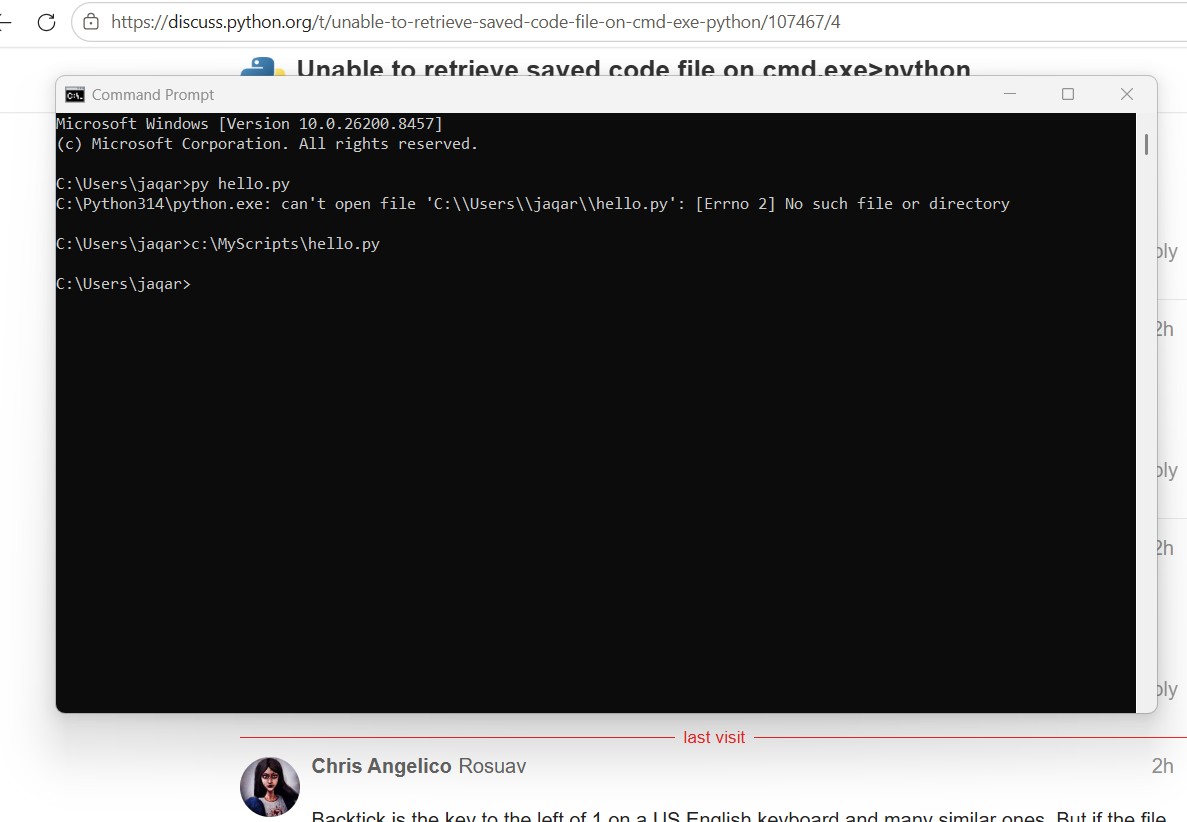
In the cmd.exe window, you should be able to run py hello.py without first going into Python. You might also be able to directly run c:\MyScripts\hello.py if associations are set up properly.
(BTW, the screen shot didn’t come through, if you want to share that with us, you may need to put it on image hosting somewhere and link to it.)
Hi. I assume that these are separate instructions in Command Prompt. I tried each as you have given now the message is saying it’s not recognising as internal or external file batch - for the first it said ‘cd’ not recognised also.
Apologies for that. I have tried the top command again and it goes to C:\MyScripts then put in hello.py and yippeeeeeee it has worked! Thank you so much. I don’t understand where my error is though.
Apologies if I’ve misunderstood the question. But isn’t it to change directory so that Python can find the .py file you’re trying to run without giving it the full absolute file path (or to ensure Python runs it in that specific directory if e.g. your own code uses other adjacent files).
It’s not really a Python specific thing, it goes for pretty much any file system and any command line shell command. Shells don’t search your entire C:\ directory tree looking for the specific file (unless you tell it to). Although they do usually search for applications in %PATH% (or $PATH in Bash)
FYI, I figured out what was happening here. The first time you typed “python”, CMD opened the REPL. That means the terminal was expecting Python code - not Windows commands. Thus, C:\MyScripts>python cmdtry.py and C:\MyScripts>python hello.py were being interpreted as syntactically broken Python, not as attempts to open a file.
In general, if you see >>> on the left side of the terminal, you’re probably in the Python REPL. You can leave it and go back to the regular command line using the exit() function.
Also, don’t manually type the C:\MyScripts> part of a command. That’ll be there for you already as long as you’re in the right directory and not in the REPL.
Yep, James is correct: that was to change directory to where you’re running your scripts. This is going to be a very common thing; when you want to run something, you go to the directory where it is, and you invoke it from there. You’ll find lots of info around the internet about how the command prompt works and how to use it efficiently.
When people post things to type, you’ll often see the prompt included there. That’s not part of what you type, but it can help you to know where to type it. For example, this is the Python REPL [1]:
>>> print("Hello, world!")
Hello, world!
This is the Windows cmd.exe command prompt:
C:\>py hello.py
This is Bash, a very common shell found on Linux, and also as part of the Windows Subset for Linux:
$ python hello.py
And there are lots and lots of others. If it looks like there’s something at the start but you don’t recognize it, ask where that’s supposed to be run. Just for fun, here’s a few others that you probably won’t encounter, but I’ll include them anyway: