I have been dabbling with Python for a while now, mostly utility scripts and the odd small GUI app but I wanted to improve my Python skills.
I seems to get a lot of e-mails from Real Python and had wondered for some time about doing one of their courses. However the most recent 30% off Black Friday offer e-mail has me rather puzzled. AFAIK, not only has their subscription never been advertised at $49 per month, but neither has the annual cost ever been shown as $599. Evidently someone’s math has let them down because $150 is not a 30% reduction on $599, although it would be correct for a reduction on $225, which, if memory serves, is their usual advertised annual subscription cost. While this still represents a discount, it does makes me suspicious of the offer and the ethos of the company offering it.
My reason for mentioning primarily is to ask whether this is a bona-fide Python course, or whether there is an alternative and better way to learn and further develop my Python skills?
BTW, is “Real Python” a flavour of Python or just the name of the course provider?
Looking at the website I am very sure Real python is a Company offering learning materials and not an alternative python environment.
Regarding marketing tactics with pricings . I really don’t like it myself and may reject such offers and companies by principle but it’s by now widespread enough that it’s not necessarily indicative of a bad company or product otherwise.
Edit: Also the price reduction is probably meant to convey how much it would cost to buy monthly (12*50) instead of annually and not referring to a temporary proce reduction.
What you would be mainly paying for is structure in my opinion since most of this information is now readily available online. If you’re open to being self taught, a book that I highly recommend is Learning Python, 6th Ed. by Mark Lutz. It teaches just about all Python fundamentals including lists, dictionaries, functions, iterators, loops, strings, f-formating, generators, modules/packages, built-in types, to name a few. Advanced topics covered include but not limited to object oriented programming (OOP), decorators, metaclasses, inheritance, polymorphism, operator overloading, composition, …, I can go on and on.
All topics are very well explained in a lot of detail. Just note that this book focuses on the language itself and not on specific library packages (i.e. panda, numpy, turtle, dataclasses, matplotlib, etc.). If you have a solid undestanding of the language, then this prepares you well for advanced specific topics and the application of specific library packages for use in modeling, GUI design, app design, control systems, etc..
Its probably to lock you in for the high up front cost since they know most users will not stick around for the totality of the annual subscription. I did a google search on this topic and it stated the following via AI response:
Users generally do not stick around for a full monthly subscription indefinitely; monthly subscription services typically have a high churn rate , meaning a significant percentage of subscribers cancel over time.
There is actually a whole body of work dedicated to this very topic (customer retention and churn rates).
Thank you. That sounds like a more feasible alternative approach for me. In my circumstances I very much prefer self learning as it allows me to learn at my own pace and with a flexible schedule. I learned Perl programming many years ago using the O’Reilly Learning Perl book.
I did wonder whether most of the course information would be available online anyway as one can often find information on a subject one can just Google it. While online searching has its place, the difficulty is ascertaining whether the information is current and whether examples are good or poor practice. When learning, one needs that structure to ensure thorough coverage of all relevant topics to be sure that the learning material is correct, trustworthy, and as current as it can be.
My daughter paid for an online course and never completed it because she got to a sticking point which I couldn’t help her with and she didn’t get appropriate support to understand the material so she just abandoned it. They still got their 600GBP fee though. I guess that’s just one example of what you describe. Of course, people may also loose interest after a while, get sick, have a change job commitments or circumstances or there may be yet other reasons. The annual fee would assure the provider that they will get their target fee regardless. Curiously, $49 x 12 is $488, so in September it would have been cheaper to go with a monthly subscription. I suppose the $599 might be based on $49 x 12 which is actually $588, so not quite.
I must admit that I don’t like monthly subscriptions. I have in the past read accounts and also experienced myself difficulties with cancellations and payments being drawn months after the supposed cancellation, so I am rather wary of them.
Interesting. A quick google shows me that $299 is equal to around 225GBP, so I wasn’t far wrong on that one, but I was obviously mistaken about the monthly fee. I hadn’t realised it was now at $49.
I would also like to ask an additional question. What is the preferred Python GUI toolkit? I am aware that Tk was used in the past as it is available cross-platform without installing additional libraries. Is it still the preferred GUI toolkit, or is there a more modern preference nowadays?
I have now purchased the Learning Python 6th Edition by Mark Lutz book as recommended by @onePythonUser.
Tkinter has the advantage that it doesn’t require third-party libraries, but doesn’t look the greatest
PyGObject looks decent, works fairly well, but there are a few versions around so you’d have to pick
PyQT is great for making a Qt-based interface; your choice between this and GTK comes down to preference, and maybe which desktop environment(s) you’re targeting
WXPython I’ve never used personally, so I can’t speak to its advantages, but it’s there as another option
And websockets. Frankly, this is possibly the cleanest UI in a number of ways, albeit with a strange quirk of requiring that you write your code in two pieces. Make your Python app provide a tiny web server, serve up a little HTML page and some JavaScript, have the JS connect back to the app using a websocket, and bam, you have yourself a GUI.
It’s definitely more about personal preference than about there being a “preferred” option. I know that a lot of people will dismiss the web browser UI out of hand, and yeah, it’s extremely heavyweight compared to some - but it has the rather huge advantage of offering an easy migration path to actual remote connections (eg having it on your phone). The traditional GUI options - and TUI options, since Python comes with full ncurses support - are definitely all worthy of a bit of research.
But if you just want to be told “here, use this, don’t bother wasting your time on the others”, then I’d say go with Tkinter. It’s far from perfect in many ways, but it comes with Python, and that’s a huge advantage.
Awesome! It is worth its weight in gold. This is the book that I taught myself with (5th Ed. to be exact but the new 6th Ed. just released this year should be a lot better since it is current and doesn’t confuse by also including v2.x material - ). It includes plenty of examples for all topics so it is very well suited for learning.
Yes, this is precisely why I advocate for this book. I learned at my own pace, and if you choose to, you can linger on certain topics a bit longer until they are fully understood.
Checks off on all boxes.
Update:
Currently I am also learning Control Systems on YouTube via Neso Academy - offered for free online. So, being that we’re on the topic of Python, I checked to see if Python is also offered. Well, you’re in luck. Here is their link:
But might be easier if you go to YouTube to view directly from there which is what I do.
Electron bundles the browser with the app and creates the illusion of a desktop app. I’m talking about using an actual browser, since - let’s be honest - everyone’s already got one of those, probably open and doing things.
I’ve built a number of tiny web apps that listen on some port on localhost. They’re functionally desktop apps, but they exist (when needed) as a tab in my browser. Downside is that the app usually has to then run even when I’m not using it, but that’s usually a small cost (if the server is completely idle).
Looks like a handful of modules are available and one can purchase “Fuel” to access additional ones. I will have the book in a couple of days, but in the meantime, these should provide a good introductory review at the very least. After that I will probably run with the book, but at 8GBP per month this is still substantially cheaper than the course I mentioned earlier.
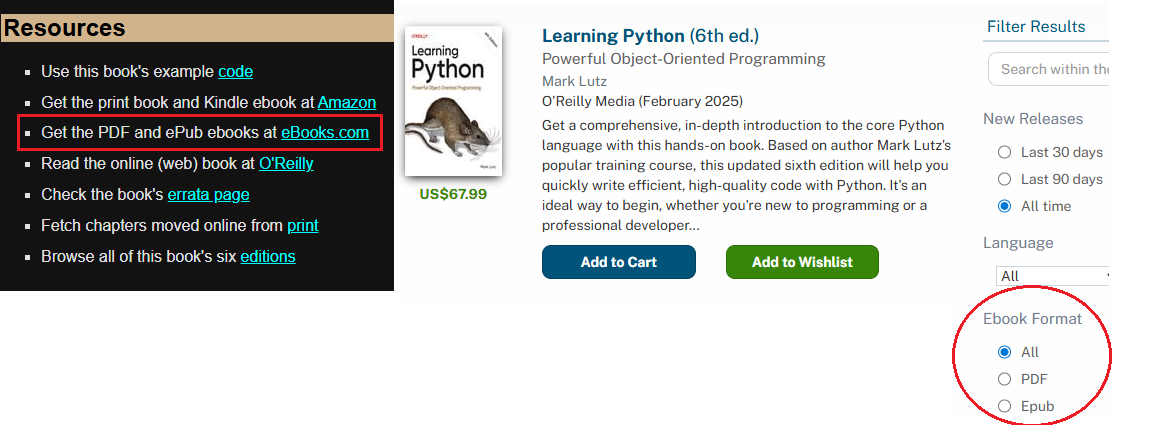
Might be preferrable to have an onscreen (.pdf) version since you won’t need an extra light source and having to reference the hard copy. With a .pdf file version, you may split screen your terminal for the book and your Python editor so you can test scripts as you’re reading along.
Ah, I see. I wasn’t aware of that site and they do indeed have this book with UK pricing. Its almost 10GBP more than what I paid for the paper copy.
Might have been nice to have, but I don’t mind waiting 24-48hrs for the paper copy. One advantage with a paper copy its easy to annotate. On the other hand having a digital copy allows one to copy and paste code snippets. Typing them out can be a bit tedious and boring, but its also an aide-memoir so I guess there are both pros and cons.
In any case, I saved a little bit on my purchase and it cost less than a one month subscription on the other resource, so I am happy with that.
I guess if I have any questions while I am working my way through it I can always ask here?
BTW, I see this thread has been renamed and moved to Python Help. That probably makes more sense than it sitting in the welcome category. Thanks admins.

 . I really don’t like it myself and may reject such offers and companies by principle but it’s by now widespread enough that it’s not necessarily indicative of a bad company or product otherwise.
 ). It includes plenty of examples for all topics so it is very well suited for learning.