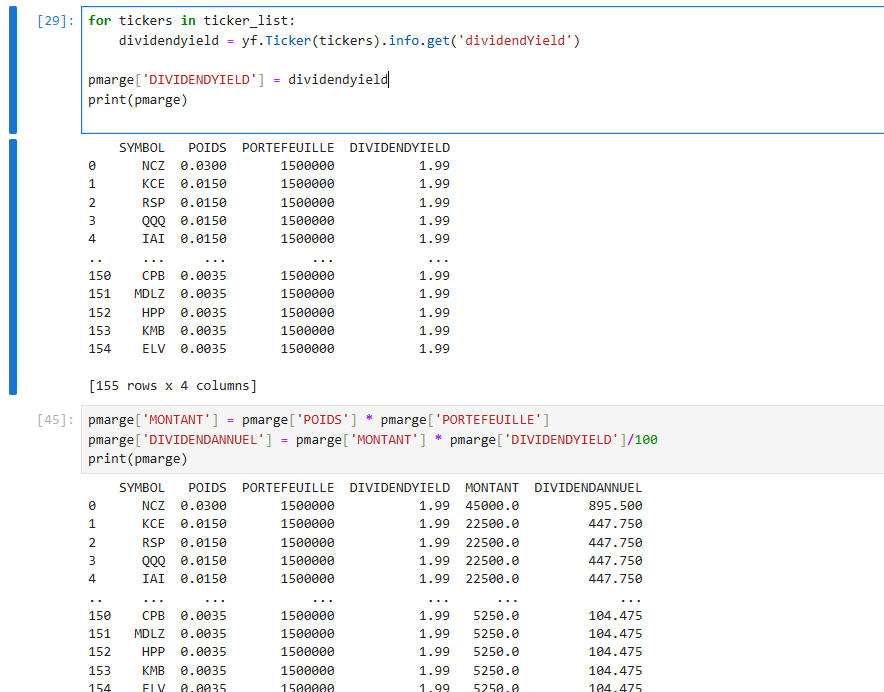
I’ve downloaded an excel file with stock tickers. With yfinance I am trying to get the dividend yield for the tickers, It gives me only the dividend yield of the last ticker, How can I get the right dividend yield for the right ticker? thank you in advance for the help!
dividendyield is being set to the last value in your for loop.
If tickers is a string, you could make dividendyield a dictionary, and make tickers a key. Something like (untested)
dividendyield = {}
for tickers in ticker_list:
     dividendyield[tickers] = yf.Ticker(tickers).info.get('dividendYield')
import yfinance as yf
import pandas as pd

tickers = ["MSFT", "IBM", "TSLA"]

dfs = [pd.DataFrame([yf.Ticker(t).info]) for t in tickers]
df = pd.concat(dfs)

print(df[["displayName", "dividendYield"]])
I got curious, so I copied @doomsdaychicken 's code. After I created a conda environment with pandas, yfinance, and cryptography I get this
(yfinance) PS C:\Users\Tim\PycharmProjects\yfinancne_test> python .\yfinance_test.py
<frozen importlib._bootstrap>:491: RuntimeWarning: The global interpreter lock (GIL) has been enabled to load module 'pandas._libs.pandas_parser', which has not declared that it can run safely without the GIL. To override this behavior and keep the GIL disabled (at your own risk), run with PYTHON_GIL=0 or -Xgil=0.
Traceback (most recent call last):
  File "C:\Users\Tim\PycharmProjects\yfinancne_test\yfinance_test.py", line 6, in <module>
    dfs = [pd.DataFrame([yf.Ticker(t).info]) for t in tickers]
                         ^^^^^^^^^^^^^^^^^
  File "d:\envs\yfinance\Lib\site-packages\yfinance\ticker.py", line 138, in info
    return self.get_info()
           ~~~~~~~~~~~~~^^
  File "d:\envs\yfinance\Lib\site-packages\yfinance\base.py", line 1020, in get_info
    data = self._quote.info
           ^^^^^^^^^^^^^^^^
  File "d:\envs\yfinance\Lib\site-packages\yfinance\scrapers\quote.py", line 555, in info
    self._fetch(self.proxy)
    ~~~~~~~~~~~^^^^^^^^^^^^
  File "d:\envs\yfinance\Lib\site-packages\yfinance\scrapers\quote.py", line 706, in _fetch
    result = self._data.get_raw_json(
        _BASIC_URL_ + f"/{self._data.ticker}", params={"modules": ",".join(modules), "ssl": "true"}, proxy=proxy
    )
  File "d:\envs\yfinance\Lib\site-packages\yfinance\data.py", line 209, in get_raw_json
    response.raise_for_status()
    ~~~~~~~~~~~~~~~~~~~~~~~~~^^
  File "d:\envs\yfinance\Lib\site-packages\requests\models.py", line 1026, in raise_for_status
    raise HTTPError(http_error_msg, response=self)
requests.exceptions.HTTPError: 429 Client Error: Too Many Requests for url: https://query2.finance.yahoo.com/v10/finance/quoteSummary/MSFT?modules=summaryProfile%2CfinancialData%2CquoteType%2CdefaultKeyStatistics%2CassetProfile%2CsummaryDetail&ssl=true
Even this doesn’t work for me from a python prompt:
result = yf.Ticker('MSFT')
result.info
Traceback (most recent call last):
  File "<input>", line 1, in <module>
  File "d:\envs\yfinance\Lib\site-packages\yfinance\ticker.py", line 138, in info
    return self.get_info()
           ~~~~~~~~~~~~~^^
  File "d:\envs\yfinance\Lib\site-packages\yfinance\base.py", line 1020, in get_info
    data = self._quote.info
           ^^^^^^^^^^^^^^^^
  File "d:\envs\yfinance\Lib\site-packages\yfinance\scrapers\quote.py", line 555, in info
    self._fetch(self.proxy)
    ~~~~~~~~~~~^^^^^^^^^^^^
  File "d:\envs\yfinance\Lib\site-packages\yfinance\scrapers\quote.py", line 706, in _fetch
    result = self._data.get_raw_json(
        _BASIC_URL_ + f"/{self._data.ticker}", params={"modules": ",".join(modules), "ssl": "true"}, proxy=proxy
    )
  File "d:\envs\yfinance\Lib\site-packages\yfinance\data.py", line 209, in get_raw_json
    response.raise_for_status()
    ~~~~~~~~~~~~~~~~~~~~~~~~~^^
  File "d:\envs\yfinance\Lib\site-packages\requests\models.py", line 1026, in raise_for_status
    raise HTTPError(http_error_msg, response=self)
requests.exceptions.HTTPError: 429 Client Error: Too Many Requests for url: https://query2.finance.yahoo.com/v10/finance/quoteSummary/MSFT?modules=summaryProfile%2CfinancialData%2CquoteType%2CdefaultKeyStatistics%2CassetProfile%2CsummaryDetail&ssl=true
I recreated my environment with just python=3.12, and then did a pip install yfinance.
The program works now.
d:\envs\yfinance\python.exe C:\Users\Tim\PycharmProjects\yfinancne_test\yfinance_test.py
  displayName  dividendYield
0   Microsoft           0.75
0         IBM           2.20
0       Tesla            NaN

Process finished with exit code 0
I was a bit surprised that I got those errors. I assumed that a conda install yfinance would be enough for that code. Looking at the meta.yaml recipe for it looks like it basically just does a pip install anyway. Not sure why the conda version gets the 429 error where the pip version doesn’t.
I created another conda environment with conda create -n yfinance_conda yfinance.
Version 0.2.57 was installed, and I got the 429 errors. I then tried to
 conda install yfinance=1
3 channel Terms of Service accepted
Channels:
 - conda-forge
 - defaults
Platform: win-64
Collecting package metadata (repodata.json): done
Solving environment: failed

LibMambaUnsatisfiableError: Encountered problems while solving:
  - nothing provides curl-cffi >=0.7,<0.14 needed by yfinance-1.0-pyhd8ed1ab_0

Could not solve for environment specs
The following package could not be installed
└─ yfinance =1 * is not installable because it requires
   └─ curl-cffi >=0.7,<0.14 *, which does not exist (perhaps a missing channel).
It turns out that curl-cffi isn’t available on Windows, but now I can run your program anyway!
python .\yfinance_test.py
  displayName  dividendYield
0   Microsoft           0.75
0         IBM           2.20
0       Tesla            NaN